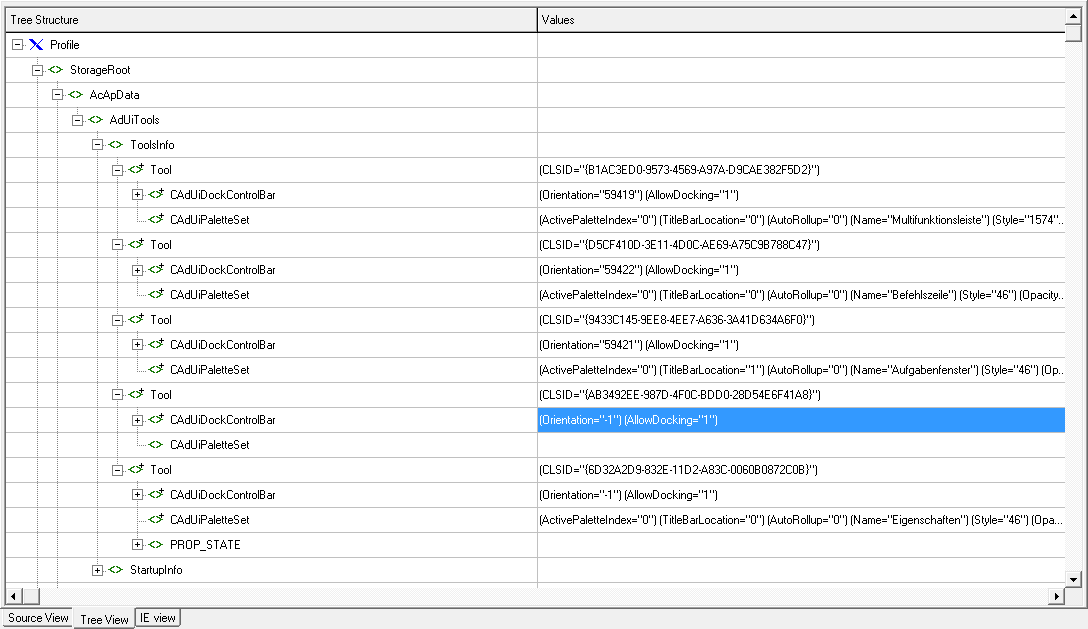
Hi, since my hotel suite has no TV I used the time before sleeping to play around with the initial settings of palette and I've found out that you can exchange the settings of your palette - if you know the GUID of it.
CLSID = Object-ID GUIID (unique for palette)
CAdUiDockControlBar: current palette state
Orientation = current docking state; values: -1 for floating and values from value list of enumDockingStyle
AllowDocking = state, if docking is allowed
FloatInfo: position and size of floating palette
Left = position from left edge of screen
Top = position from top edge of screen
Width = palette width
Height = palette height
DockInfo: position and size of docked palette
Left = position from left edge of screen
Top = position from top edge of screen
Width = palette width
Height = palette height
MRUDockID = docking style of docked palette (this is the place the currently floating palette will be docked at when doubleclicking the titlebar); must be identical to the value of Orientation, if palette is docked
CAdUiPaletteSet: advanced display properties
ActivePaletteIndex = is palette active at start of AutoCAD: 0=no; 1=yes
TitleBarLocation = side of titlebar of the floating palette: 0=left; 1=right
AutoRollup = automatic collapse: 0=no; 1=yes
Name = TitelBarText
Style = no idea
Opacity = transparency at OnMouseOff; values between 0 and 100; 100=completely visible
RolloverOpacity = transparency at OnMouseEntered; values between 0 and 100; 100=completely visible
Visible = is palette expanded: 0=no; 1=yes
Values for enumDockingStyle
59417 left, collapsed
59418 right, collapsed
59419 top
59420 left
59421 right
59422 bottom
I'm going to develop an function to change the settings in the aws file. Stay tuned! ;)
Fred
 aws.png (21447 bytes)