a little assistance please

Started by andrew · 2009-12-02 17:45 UTC · 21 replies · SMF topic #1048

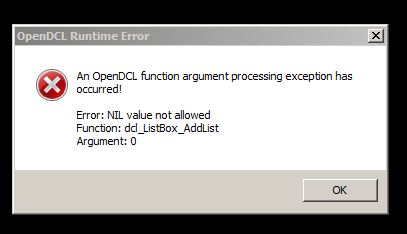
i get the error message
Error: NIL value not allowed
Function: dcl_control_setlist
Argument: 0

here is my code


(command "OPENDCL")

(defun c:Hello ()

; call the method to load the HelloWorld.odcl file.
(dcl_Project_Load "od-test1" T)

; call the method to show the Hello World dialog box example
(dcl_Form_Show od-test1_Form1)
(princ)
)

(defun c:od-test1_Form1_TextButton1_OnClicked (/)
(dcl_Form_Close od-test1_Form1)
)

(defun c:od-test1_Form1_OnInitialize (/)
(setq datafile "c:\test.txt")
        (setq ofile (open datafile "r"))
        (while (setq curline (read-line ofile))
          (setq file_content_list (cons curline file_content_list))
        )
        (close ofile)

        (setq file_content_list (reverse file_content_list))
  (dcl_Control_SetList od-test1_Form1_ListBox1 file_content_list)
)


(defun c:od-test1_Form1_TextButton2_OnClicked (/)
  (dcl_Control_GetCaption od-test1_Form1_TextButton2)
)


the file test.txt does exist in the local C
what am i doing wrong?

Just a guess ... I'd need the odcl  to test..
try
(setq datafile "c:\\test.txt")
or
(setq datafile "c:/test.txt")
here is the odcl file

Attachments
i got it working, i just deleted the files and re-created them
i created a new file and its not displaying the list again

good greif

Andrew,
did you try changing
(setq datafile "c:\test.txt")
to
(setq datafile "c:\\test.txt")


and I think that
(dcl_Control_SetList od-test1_Form1_ListBox1 file_content_list)
should be
(dcl_ListBox_AddList od-test1_Form1_ListBox1 file_content_list)

but I'd need to see the contents of the Test.txt file.
You are trying to populate the list, yes ?
Is the file_content_list a list of lists ?
Kerry,
I did try the other method and it still didnt work.

the txt file is just lines of directory paths of drawing

ex.
C:\Users\andrew\Documents\Drawing1.dwg
C:\Users\andrew\Documents\Drawing2.dwg
etc.

i didnt use the (dcl_ListBox_AddList od-test1_Form1_ListBox1 file_content_list)
because im not looking to append new items to the list, just to read a txt file and display what is in the txt file.

it works on 1 test file i made but not on another. i cant imagine why.

thanks for your help

OK,
Here is your problem.

The ODCL file is named od-test1.ODCL
The Events in the editor are named od-test_Form1.xxxxx
The Events in the lisp file are named od-test1_Form1.xxxxx

So, the events in the ODCL are named differntly to the eventFunctions in the Lisp File

To fix this :
I unchecked and rechecked each event so that they were renamed to  od-test1_Form1.xxxxx

Changed the
(setq datafile "c:\test.txt")
to
(setq datafile "c:\\test.txt")


I changed the
(dcl_Control_SetList od-test1_Form1_ListBox1 file_content_list)
To
(dcl_ListBox_AddList od-test1_Form1_ListBox1 file_content_list)


Seems to work on the .TXT file I made ( a list of qualified DWG path/file names.)

Regards
author=Kerry Brown link=topic=1048.msg5470#msg5470 date=1259854471 wrote:

OK,
Here is your problem.

The ODCL file is named od-test1.ODCL
The Events in the editor are named od-test_Form1.xxxxx
The Events in the lisp file are named od-test1_Form1.xxxxx

So, the events in the ODCL are named differntly to the eventFunctions in the Lisp File

To fix this :
I unchecked and rechecked each event so that they were renamed to  od-test1_Form1.xxxxx

Changed the
(setq datafile "c:\test.txt")
to
(setq datafile "c:\\test.txt")


I changed the
(dcl_Control_SetList od-test1_Form1_ListBox1 file_content_list)
To
(dcl_ListBox_AddList od-test1_Form1_ListBox1 file_content_list)


Seems to work on the .TXT file I made ( a list of qualified DWG path/file names.)

Regards


i appreciate your help
the fixing of the form1 helped but these other changes changes didnt help.

changed this line didnt make a difference
(setq datafile "c:\test.txt")
to
(setq datafile "c:\\test.txt")


in fact i get errors on my working model when i changed the

(dcl_Control_SetList od-test1_Form1_ListBox1 file_content_list)
To
(dcl_ListBox_AddList od-test1_Form1_ListBox1 file_content_list)


whats even more strange, and im certain its something im missing as it usually is, is that i re-created this same form in a modelss form and its not displaying the list again.

back to the drawing board... thanks again
in fact i get errors on my working model when i changed the .....


What error Message ??

Just for Info

(command "OPENDCL")

(defun c:Hello ( / file_content_list)                                                
 (dcl_Project_Load "od-test1" T)                                
 (dcl_Form_Show od-test1_Form1)
 (princ)
)

(defun c:od-test1_Form1_TextButton1_OnClicked (/)
 (dcl_Form_Close od-test1_Form1)
)

(defun c:od-test1_Form1_OnInitialize (/ datafile ofile curline)
 (setq datafile "c:\\test.txt")
 (setq ofile (open datafile "r"))
 (while (setq curline (read-line ofile))
   (setq file_content_list (cons curline file_content_list))
 )
 (close ofile)
 (setq file_content_list (reverse file_content_list))
 (dcl_ListBox_AddList od-test1_Form1_ListBox1 file_content_list)
)


(defun c:od-test1_Form1_TextButton2_OnClicked (/)
 (dcl_Control_GetCaption od-test1_Form1_TextButton2)
)

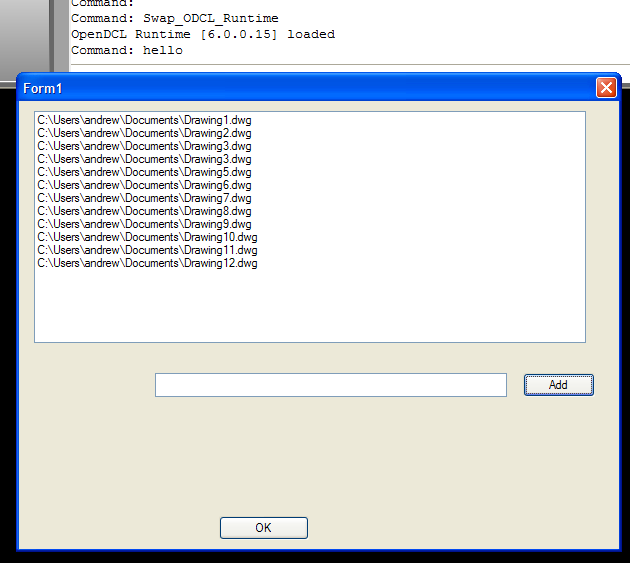
The dialog piccy attached :
Attachments
i didnt think this would be so difficult but good lord...
i must have re-written this code at least 10 times
Attachments
Looks to me as if the control names are wrong or file_content_list is nil ...

post(attach)  the LSP and ODCL that is a problem.
i had a misspelling in the test lisp which caused that...
forgive my ignorance.

it does seem that my file_content_list is coming up nil
which is why its not displaying.

i cant understand why if it work on one file and not the other.
even if i rename the working test file to something else and change the proper lines to reflect the name change, the list box returns empty, if i rename it back to the original lines, it works.
is this something that you can not do with odcl?


Argument 0 is the control name.
Andrew, I recommend to spend some learning how to debug your code with the VLIDE.  You can step through the code with the VLIDE to see where it is failing rather than changing things randomly in hopes that it will suddenly work.
author=owenwengerd link=topic=1048.msg5482#msg5482 date=1259859413 wrote:
Andrew, I recommend to spend some learning how to debug your code with the VLIDE.  You can step through the code with the VLIDE to see where it is failing rather than changing things randomly in hopes that it will suddenly work.


Owen, thanks for the help.

I ran the code alone thru vlide, and it works as it should.
but when i incorporate it into the odcl code it doesnt work

even when i use the following code in place of reading an external file it still dont list


(defun c:od-toolbox_Form1_OnInitialize (/ datafile ofile curline) 
  (setq datafile "c:\\test.txt") 
  (setq ofile (open datafile "r")) 
  (while (setq curline (read-line ofile)) 
    (setq file_content_list (cons curline file_content_list)) 
  ) 
  (close ofile) 
  (setq file_content_list (reverse file_content_list)) 
; (dcl_ListBox_AddList od-toolbox_Form1_ListBox1 file_content_list) 
  (dcl_ListBox_AddList od-toolbox_Form1_ListBox1 "hello" "world")
)

The function expects a list

so, try
(dcl_ListBox_AddList od-toolbox_Form1_ListBox1 (list "hello" "world")  )
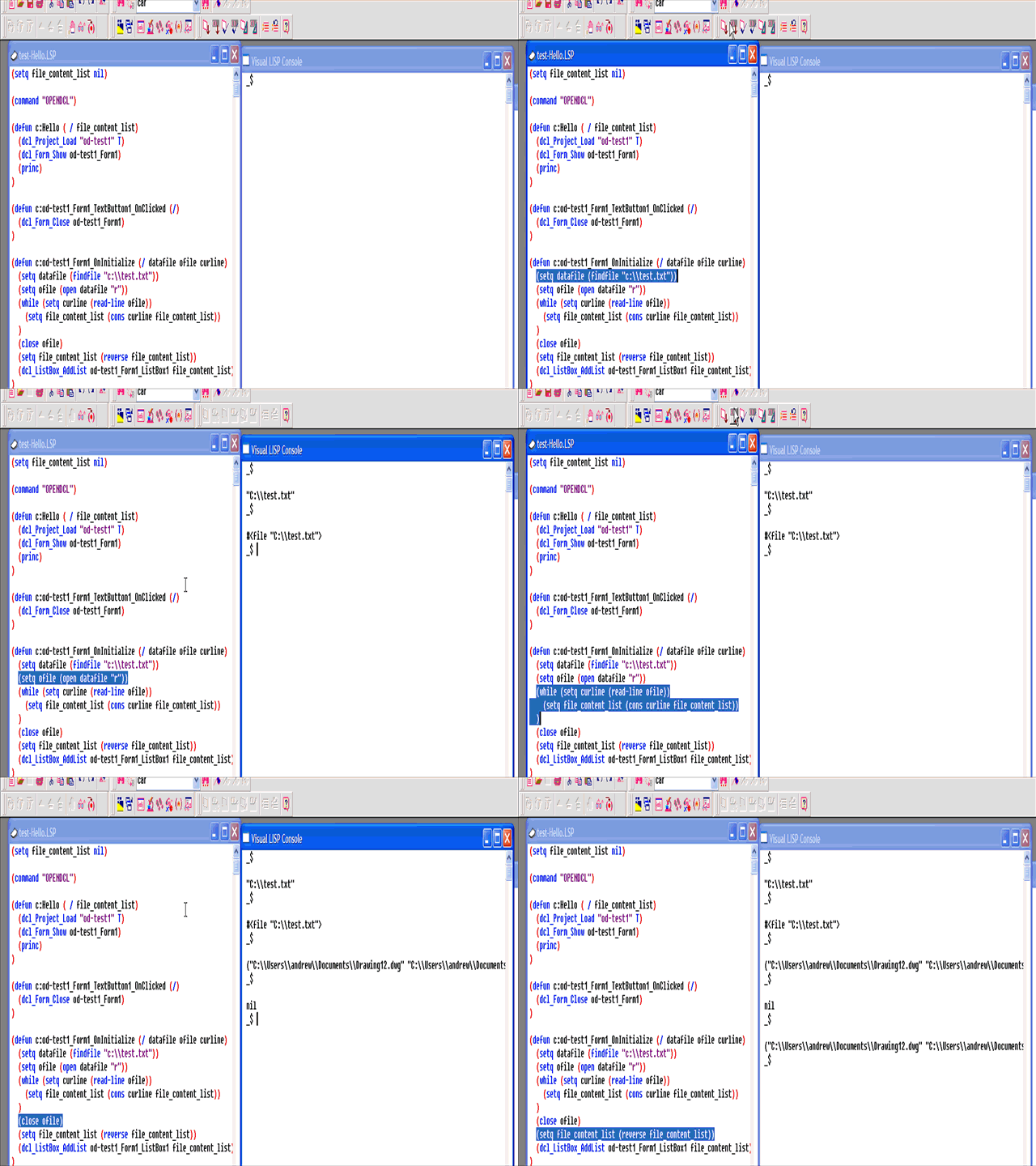
Try something like this for debugging..

Note I've added the findfile
(setq datafile (findfile "c:\\test.txt"))

Recording set to run once.  F5 refresh to replay.

Attachments
yep mine works the same way
???

here are my files can you run them and tell me if they work for you?
Attachments
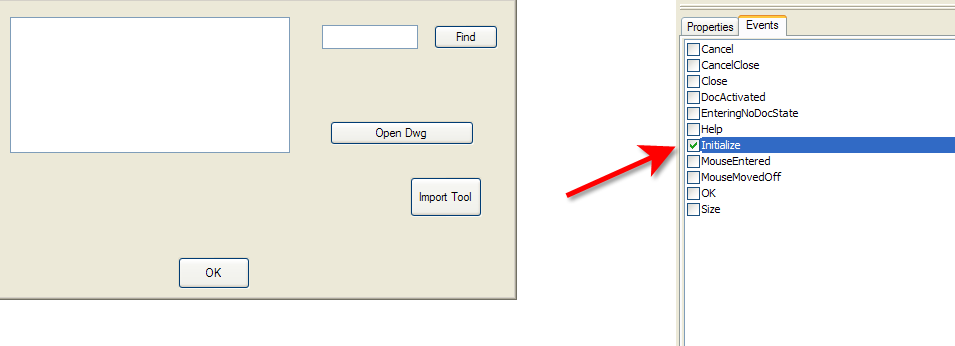
You don't have the "Initialize" event checked on your form.
Remember to save your project after you do..
Attachments
author=BazzaCAD link=topic=1048.msg5494#msg5494 date=1259868218 wrote:
You don't have the "Initialize" event checked on your form.
Remember to save your project after you do..


wow that was simple heh

thanks everyone for the help