2010-01-15 21:08 UTC
Question:
Answer:
There is no built-in menubutton control and no popupmenu control in OpenDCL.
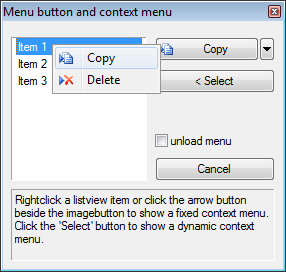
But you can workaround that with a static or dynamic shortcutmenu based on a loaded menu.
The attached project demonstrates solutions for all questions above. In every case a popupmenu is needed to be shown by the AutoLISP menucmd-function.
(defun c:showmenu ()
(MENUCMD "P0=MENUBUTTON.MENUBUTTON")
(MENUCMD "P0=*")
(princ)
); c:showmenu
The macro of each menu item either calls an event for the dialog or another command.
The menu button changes the current method after selecting a menubutton item.
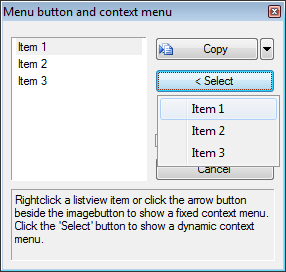
The select button of this sample invokes a progress of reading all listview items to create a shortcut menu of them.
This sample shows how to handle with a dynamic shortcutmenu.
Many thanks to {2} and {2} for their samples.
Note: all the contents of the archive must be placed in a AutoCAD support path. Should work for all AutoCAD releases from R16.0 up to 18.1!
Fred
- How can I set a context menu to a tree item or listview item?
- How can I create a menu button?
- How can I show a shortcutmenu with a certain content depending on the clicked item?
Answer:
There is no built-in menubutton control and no popupmenu control in OpenDCL.
But you can workaround that with a static or dynamic shortcutmenu based on a loaded menu.
The attached project demonstrates solutions for all questions above. In every case a popupmenu is needed to be shown by the AutoLISP menucmd-function.
(defun c:showmenu ()
(MENUCMD "P0=MENUBUTTON.MENUBUTTON")
(MENUCMD "P0=*")
(princ)
); c:showmenu
The macro of each menu item either calls an event for the dialog or another command.
The menu button changes the current method after selecting a menubutton item.
The select button of this sample invokes a progress of reading all listview items to create a shortcut menu of them.
This sample shows how to handle with a dynamic shortcutmenu.
Many thanks to {2} and {2} for their samples.
Note: all the contents of the archive must be placed in a AutoCAD support path. Should work for all AutoCAD releases from R16.0 up to 18.1!
Fred
Attachments
- menubutton.zip (15293 bytes)
 static.png (10998 bytes)
 dynamic.png (10264 bytes)