2010-01-29 17:22 UTC
I am working through the tutorial provided and at the top of page 7 is reads:
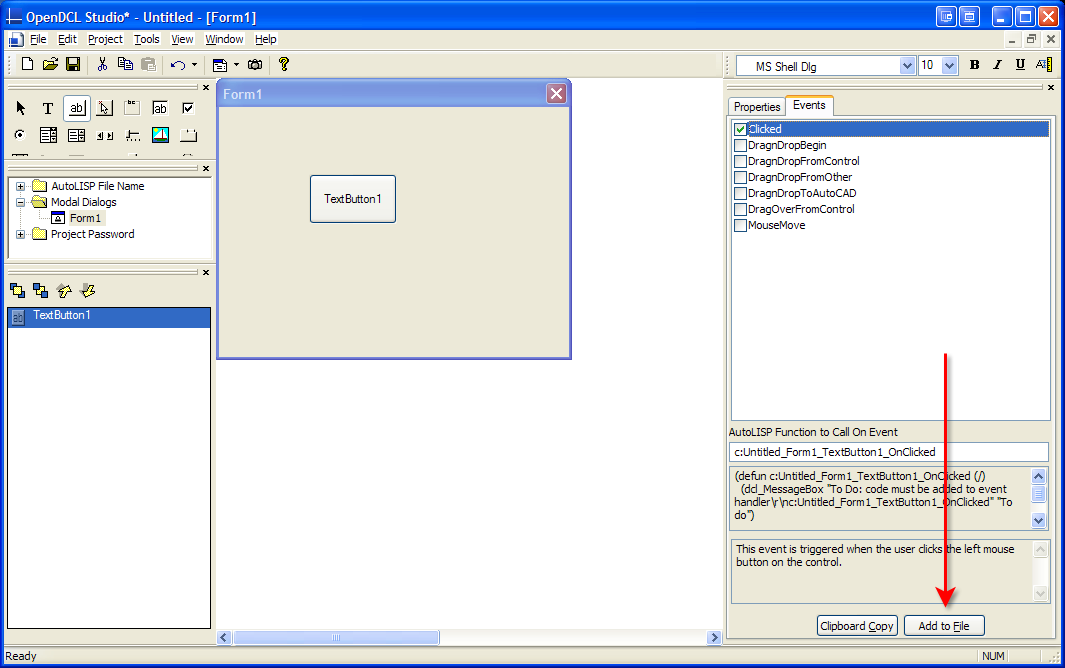
This time around instead of copying the Event code to our clipboard, we’re going to save our selves a few clicks. Back in the Studio under the Tools pull-down menu, select “Write Events to Lisp File”. Now select the OK button, and switch to the Events tab, if it’s not already selected. Check the “Clicked” event, and then hit the “Add to File” button.
However, when I check "Write Events to Lisp File" I don't see any "Add to File" button. Am I missing something?
--
Phillip
This time around instead of copying the Event code to our clipboard, we’re going to save our selves a few clicks. Back in the Studio under the Tools pull-down menu, select “Write Events to Lisp File”. Now select the OK button, and switch to the Events tab, if it’s not already selected. Check the “Clicked” event, and then hit the “Add to File” button.
However, when I check "Write Events to Lisp File" I don't see any "Add to File" button. Am I missing something?
--
Phillip