Started by Jürg Menzi ·
2010-04-19 15:45 UTC ·
12 replies · SMF topic #1258
Jürg Menzi
2010-04-19 15:45 UTC
Hi all
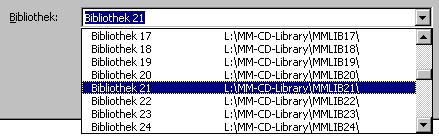
Is there a way to create a combolist with multiple columns in the dropdown part? (see pic)
Until now I didn't found any solution.
Cheers
Jürg
fred_tomke
2010-04-19 18:53 UTC
Hi, Jürg, try a \t between both parts.
(strcat strTitle "\t\t" strPath)
VG
Jürg Menzi
2010-04-20 07:42 UTC
Hi Fred
Already tried, but Tab's are ignored...
Cheers
Jürg
fred_tomke
2010-04-20 07:47 UTC
Hm, that's really bad... :(
Fred
fred_tomke
2010-04-20 07:50 UTC
Hm, maybe it's worth to add a
{2} to allow \t in comboboxes.
Fred
Jürg Menzi
2010-04-20 09:28 UTC
author=Fred Tomke link=topic=1258.msg6764#msg6764 date=1271749800 wrote:
Hm, maybe it's worth to add a {2} to allow \t in comboboxes.
Fred
Done...
owenwengerd
2010-04-25 05:52 UTC
Just curious, did you test with the Multicolumn property set to True?
fred_tomke
2010-04-26 06:21 UTC
I don't believe he could because there is none for the combobox...
Fred
fred_tomke
2010-04-28 20:14 UTC
author=owenwengerd link=topic=1258.msg6809#msg6809 date=1272174738 wrote:
Just curious, did you test with the Multicolumn property set to True?
The combobox has no Multicolumn property, also in Alpha 26. Shall I add as bug report or feature request?
Fred
owenwengerd
2010-04-29 02:11 UTC
Juerg already added a feature request for this.
Jürg Menzi
2010-06-14 12:23 UTC
Hi Owen
May I ask for possible realisation schedule?
Cheers
owenwengerd
2010-06-14 17:53 UTC
I did some research, and found that there isn't any way to support tabbed columns in the built in control, so it will require a custom control. Since this is a lot of work, it will not be possible until a future version. It might be possible to fake your own custom combo in the meantime by using a modeless form with a standard listbox for the dropdown list.
Jürg Menzi
2010-06-15 13:32 UTC
Hi Owen
Thanks for the response.
author=owenwengerd link=topic=1258.msg6934#msg6934 date=1276538035 wrote:
It might be possible to fake your own custom combo in the meantime by using a modeless form with a standard listbox for the dropdown list.
Seems an usable workaround.
Cheers
 ODCL MultiColumn ComboBox.jpg (18062 bytes)