Started by khann ·
2010-04-23 08:34 UTC ·
5 replies · SMF topic #1268
khann
2010-04-23 08:34 UTC
Hi.
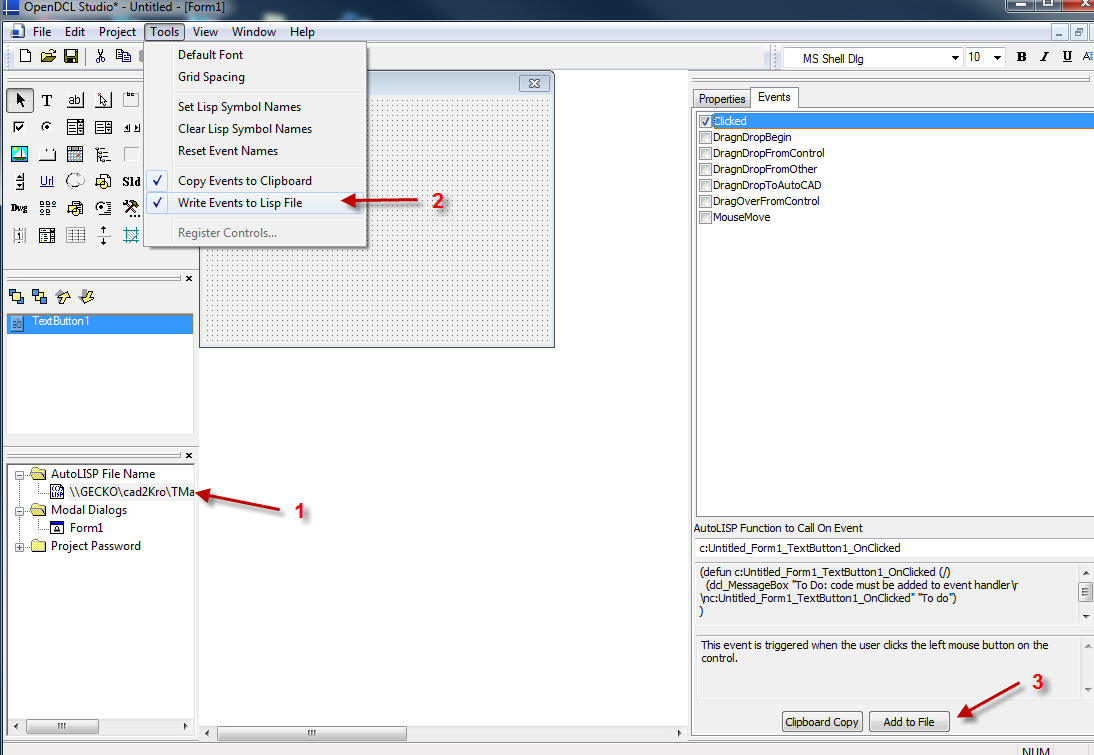
AutoLisp File Name in the "project pane "
What does this do?
Hope anyone tell me some story. ;D
fred_tomke
2010-04-23 09:31 UTC
Hi, khann
the activated event names can copied automatically into this lisp-file.
Fred
bazzacad
2010-04-23 17:07 UTC
khann
2010-04-26 00:28 UTC
Ooops.
What a stupid I am. :'(
Till now I've copied all the event and pasted manually since last year.
Does Help Topics has this story?
I've checked many times about that, but I count not find the above message.
Everytime clicking the [ Clipboard Copy ] button I wondered there could be another way.
From now I can copy the events automatically.
Thank you gentlemen! :)
bazzacad
2010-04-26 16:31 UTC
Using the Copy\Paste method actually is the safer way of working.
If you make changes to your Lisp code & don't save it before you hit the "Add to File" button, your lisp will revert back to the original version & you could lose some of your work.
So I've always used the "Clipboard Copy" for years now.
khann
2010-04-29 04:50 UTC
Thanks again.
I'll keep this in mind. :D
 lsp.png (74028 bytes)