A short list of problems..

Started by krunch · 2010-12-16 14:27 UTC · 24 replies · SMF topic #1558

I made a list of all kinds of defects, bugs, remarks... that I met

My version is 6.0.1.3 - Windows Vista + ACad2008


Controls and Forms

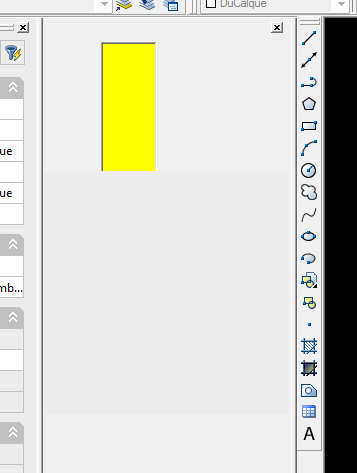
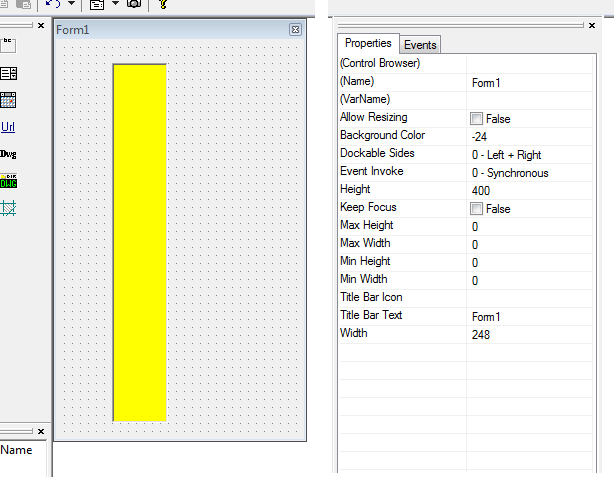
Palette / ControlBar are croped ?
When AllowResizing=false the palette is croped at about height = 160 ? (AllowResizing=true OK)
See images

Tab sequence
Problem with Tab-key sequence between txtbox (didn't try others) in Modeless / ControlBar / Palette (KeepFocus=true)
Please lunch and read TabSequence.odcl

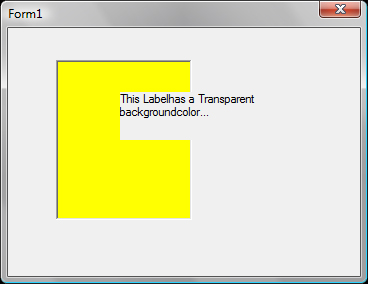
Label with Transparent background color
Transparent background is not... (this problem appeared with v6)
See image

TextBox with Filter property = 3 (numeric units)
The filter allows following entries : " ' / + - . e  ( but not * )

ComboBox : SelChanged event
SelChanged event is triggered even if the selection hasn't changed (after clicking on the same item)


Attachments
And here my remarks about interface..

OpenDCL interface

Form's background color Display
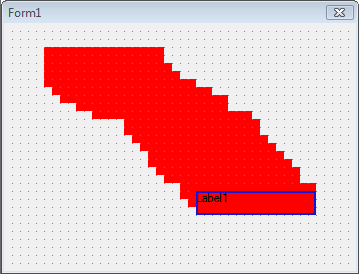
Display of Form's background is not updated
On the screenshot I have turned (Form1) background color to 1, added a textbox and moved it...

Moving multiple controls selection

When we move multiple controls selection, each control is 'snaped' to grid's closest point...
But it's common to position controls with arrows-key, or that control dimensions are out of grid...In this case controls corners "exit" from the grid.
When you move such controls in a multiple selection, the relative position between controls is changing.
The problem is that we can't disabled the grid before moving.

Editing multiple controls selection by right-clic menu
When we right-click on a multiple controls selection (for example to copy it), the selection is lost, only 1 control under the mose is selected...
May be you could keep the selection and display the menu with grayed options (Properties and Control Browser) in case of multiple ?

Background color editing
True color RED (first of the 2nd line) is #255, so it's white...

Closing if not saved
Many properties modifications and editions don't trigger the "Save change ?" alert


Attachments
Good stuff, thanks!  Going through it now...
author=krunch link=topic=1558.msg7611#msg7611 date=1292509639 wrote:
Palette / ControlBar are croped ?


Palettes with Allow Resizing set to False are notoriously problematic in this release. I believe I have now fixed the problem of diplaying incorrectly when initially loading as docked, but there are additioonal problems that become apparent when moving or changing the dock state of non-resizable palettes.


author=krunch link=topic=1558.msg7611#msg7611 date=1292509639 wrote:
Tab sequence


Good catch. This problem is now fixed.


author=krunch link=topic=1558.msg7611#msg7611 date=1292509639 wrote:
TextBox with Filter property = 3 (numeric units)


This is working as designed. The accepted characters are all valid characters for numeric input in AutoCAD, but "*" is not.


author=krunch link=topic=1558.msg7611#msg7611 date=1292509639 wrote:
ComboBox : SelChanged event


This is working as designed. Since the selection event is a discrete event, it should be triggered even when reselecting a previously-selected item. This behavior gives maximum control to the event handler which can ignore cases where no action is required.
author=krunch link=topic=1558.msg7612#msg7612 date=1292509766 wrote:
Form's background color Display


This is now fixed.


author=krunch link=topic=1558.msg7612#msg7612 date=1292509766 wrote:
Moving multiple controls selection


This design is not ideal, but it is working as designed. I recommend to add a feature request to make sure this problem does not get forgotten and gets addressed in the future.


author=krunch link=topic=1558.msg7612#msg7612 date=1292509766 wrote:
Editing multiple controls selection by right-clic menu


This is now fixed. It should select the control only when right-clicking on an unselected control, otherwise it should display a menu appropriate for the current selection.


author=krunch link=topic=1558.msg7612#msg7612 date=1292509766 wrote:
Background color editing


I had to use some trickery (setting a high bit that is not normally used), but this should now be fixed.


author=krunch link=topic=1558.msg7612#msg7612 date=1292509766 wrote:
Closing if not saved


Please provide a sample and/or specific steps to reproduce this problem.
Palette / ControlBar
Palettes with Allow Resizing set to False are notoriously problematic in this release. I believe I have now fixed the problem of diplaying incorrectly when initially loading as docked, but there are additioonal problems that become apparent when moving or changing the dock state of non-resizable palettes.

I make a tool that uses a Control bar (or Palette) so I could make a more accurate report later if you want.

TextBox with Filter property = 3 (numeric units)
This is working as designed. The accepted characters are all valid characters for numeric input in AutoCAD, but "*" is not.

This is not a big problem. Anyway to get a reliable input, TextBox needs a (rtos(atof ..)) function before reading the numeric value (in KillFocus for example)
But one wonders what " ' / are for.

Moving multiple controls selection
This design is not ideal, but it is working as designed. I recommend to add a feature request to make sure this problem does not get forgotten and gets addressed in the future.

Feature request on sourceforge.net ? Yes I could do that. I think all we need is a checkbox to disable the grid (or to set a 'virtual' step to 1 pixel)

Closing if not saved
Please provide a sample and/or specific steps to reproduce this problem.

Well.. right now I can not find what operation/context is concerned (I don't think I was dreaming), but I'll report if I find


There was also Label's Transparent backgroundcolor when Label is placed on a colored PictureBox...
Thanks!
author=krunch link=topic=1558.msg7629#msg7629 date=1292839712 wrote:
I make a tool that uses a Control bar (or Palette) so I could make a more accurate report later if you want.


If there are discrete bugs that can be fixed, I am interested in those bug reports, otherwise it would be best to wait until the next major version after I have redesigned the infrastructure for palettes and control bars.

author=krunch link=topic=1558.msg7629#msg7629 date=1292839712 wrote:
But one wonders what " ' / are for.


Those are valid characters when entering numbers in imperial architectural units.

author=krunch link=topic=1558.msg7629#msg7629 date=1292839712 wrote:
Feature request on sourceforge.net ? Yes I could do that. I think all we need is a checkbox to disable the grid (or to set a 'virtual' step to 1 pixel)


I think it would be acceptable to simply use the topmost/leftmost corner of all selected controls as the snap point, and leave relative control positions unchanged while dragging.


author=krunch link=topic=1558.msg7629#msg7629 date=1292839712 wrote:
There was also Label's Transparent backgroundcolor when Label is placed on a colored PictureBox...


That is working as designed. Windows does not make any guarantees about painting order when controls overlap, so you should think of transparent as meaning "same background color as the host dialog background".
Quote from: krunch on December 20, 2010, 03:08:32 AM
There was also Label's Transparent backgroundcolor when Label is placed on a colored PictureBox...

That is working as designed. Windows does not make any guarantees about painting order when controls overlap, so you should think of transparent as meaning "same background color as the host dialog background".


Ok.. but I'd just like to know if I have to leave this overlapping (made with previous version, label background was effectively transparent)


If there are discrete bugs that can be fixed, I am interested ...


One little problem of reactor..
Palette/ControlBar (keepfocus=true) : OnMouseMovedOff event is not triggered if focus is 'catched' by a TextBox or a ComboBox (if there's a text vertical cursor or if an item is selected in combobox)
author=krunch link=topic=1558.msg7639#msg7639 date=1293060906 wrote:
Ok.. but I'd just like to know if I have to leave this overlapping (made with previous version, label background was effectively transparent)


It's perfectly OK to have overlapping controls, but either they should both have transparent backgrounds, or they should both have non-transparent backgrounds and you should be aware that there is no guarantee which will be painted last (on top).


author=krunch link=topic=1558.msg7639#msg7639 date=1293060906 wrote:
Palette/ControlBar (keepfocus=true) : OnMouseMovedOff event is not triggered if focus is 'catched' by a TextBox or a ComboBox (if there's a text vertical cursor or if an item is selected in combobox)


This is a side effect of capturing the mouse while a Keep-Focus control has the focus. Technically, the mouse has not "moved off" because it is captured. I would be interested in use cases where the current behavior causes a problem.
Hi

I would be interested in use cases where the current behavior causes a problem.


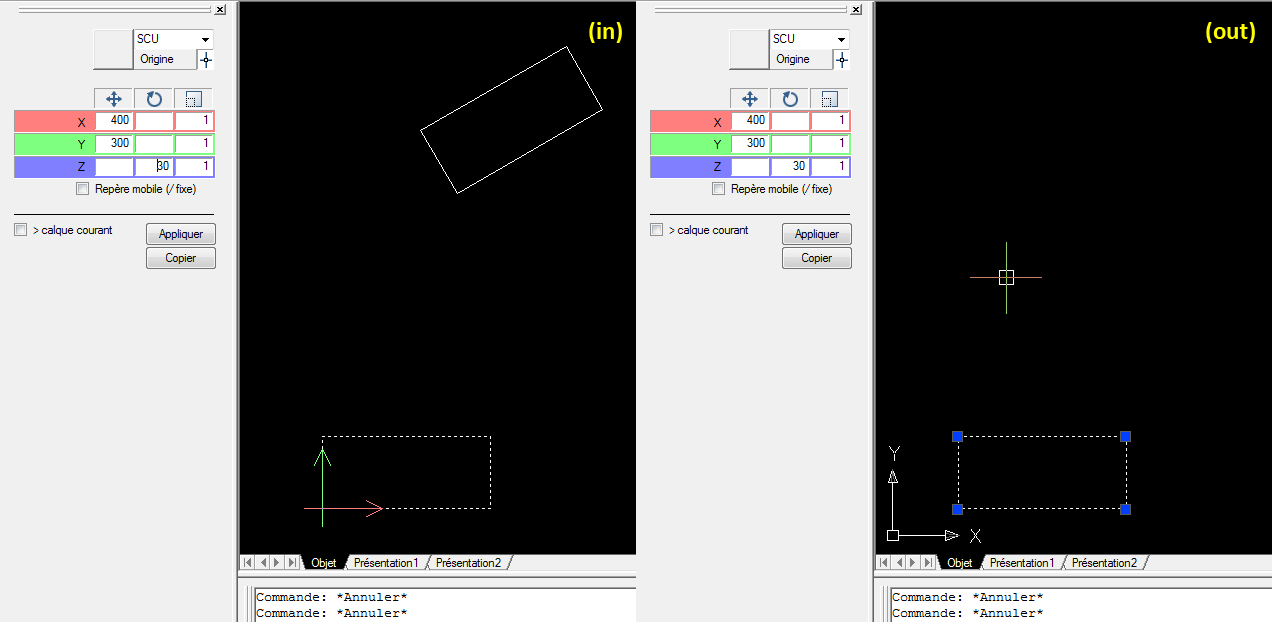
I finish a tool that could works in a static palette or controlbar (screenshot)..
If you consider a palette as a settings area for a parametric operation (here a sequence of transformations) then it could also make a preview of the operation with the current selection.
If something changes in the palette a new matrix is computed and the preview is updated (there are many triggers in this palette).

So it uses MouseEntered/MovedOff as following :
- (if nothing is selected the palette is disabled)
- when the pointer goes in the palette the program 'ungrip' the selection, copy the objects, and apply the transformation matrix
- when the pointer goes out it restores a gripped selection and deletes the copy.

So to apply you just have to select, to set a transformation and click on the 'Apply' button ; and to cancel you just have to forget and do something else ! In both cases parameters could stay to be applied on another selection.

It works fine, except when moved off after a textbox setting (it just needs a click more)
Attachments
I just found another strange thing about OnMouseEntered/OnMouseMovedOff events with Palettes or ControlBar (KeepFocus=true)
These events make unexpected triggers after 1 click on a PictureBox (Drag/DropAllowBegin=true)

Please open and try "in-out.odcl"

(command "OPENDCL")
(defun c:go ()
  (dcl_Project_Load "in-out" T)
  (dcl_Form_Show in-out_Form1)
)
(defun c:in-out_Form1_OnMouseEntered (/)
  (princ "\nin")
)
(defun c:in-out_Form1_OnMouseMovedOff (/)
  (princ "\nout")
)
Attachments
For the next build, I have changed the code to trigger MouseMovedOff even while the input is captured, and I think I've fixed the picturebox problem as well. Hopefully this addresses all your issues.
krunch,

from the look of those piccys you've been having some fun with marrix translations.
good concept if I understand what you're doing :)

Regards,
Tanks... it was fun although many neurons died in this affair.. I'll try to distribute it quickly
Good year everybody
Hi
I plan an alternative to the previous project (images above) that works with a Modeless, and am having similar problems of focus transfer..

You said :
For the next build, I have changed the code to trigger MouseMovedOff even while the input is captured

So I just have 2 questions :

In fact I would need a MouseMovedOff trigger AND that AutoCad recover the focus when I leave the Form (even if  the input is captured in a textbox). Currently it needs 1 click in the graphic screen to recover focus in AutoCad, but it makes trouble because this click makes a new selection...
So my question is that it will be the case ? (may be it could be possible if KeepFocus=nil ?).. Or is there a way to give back the focus to ACad from this (new) MouseMovedOff trigger ?

Can I expect the same behavior with Modeless ?
I think you would need Keep Focus set to false.  I am planning to upload the next build this week (most likely tomorrow).
Sorry, I realise that I didn't understood the KeepFocus property : with false it works fine !
Actually my question goes against the logic of this property, moreover with false MouseMovedOff always triggers..  ::)

Thanks!
Tried with latest version 6.0.2.1 :
The first problem I reported in this post (Palette/ControlBar are croped if AllowResizing=false) is always there with ControlBar..
Hello  krunch,
Did you see the post already below? 
{2} 
This problem could be included in your list.

Regards,
Hello
Yes, there were a few problem with anchored Palette/ControlBar.
I have not tried all since Owen said :
otherwise it would be best to wait until the next major version after I have redesigned the infrastructure for palettes and control bars


Regards


By the way.. what software do you use to make animated .gif screenshoot ??
author=krunch link=topic=1558.msg7711#msg7711 date=1295861856 wrote:
Hello
Yes, there were a few problem with anchored Palette/ControlBar.
I have not tried all since Owen said :
otherwise it would be best to wait until the next major version after I have redesigned the infrastructure for palettes and control bars


Regards


By the way.. what software do you use to make animated .gif screenshoot ??


I use Cantasia Studio.
Thanks

I get the same problem (ACad2008) with minimized Palette : the left bar blinks when I roll on it, and open-close the palette if it's anchored (and freeze it if closed)
^^^^
This is my biggest problem with palettes and would like to see it moved up the "list of things to do".

jb

BTW, great job Owen.  You are securing a special place in programmers heaven . . ..
When I first implemented palettes I had never used them before, and consequently, some of original architecture should be redesigned. I don't want to do that so late in the release cycle, but I plan to revisit palettes once OpenDCL 6 is released.
Meanwhile a ControlBar* can replace a Palette...


but I plan to revisit palettes once OpenDCL 6 is released

But just to know : when do you think it will be ok ?

* with AllowResizing=T (cropped if nil)