Hi, svranic,
at first, welcome on board, svranic!
It is not necessary to uncheck and to re-check the toggle for a certain event in the events tab. Unchecking and rechecking is only needed if you copy a control. All properties of this control are copied, too. And since events are handled like properties, the event names which were set by checking the event toggle, they are copied, too. If the control shall do something different to the other control, you can either rename the functionname of the event by hand (I do that very seldom), or you uncheck and re-check the toggle or - like Kerry wrote - you use the ResetEventNames command from the menue. But the ResetEventNames command does it for all the controls of the active form (dialog or active tab!).
You can avoid that if you do not copy controls but draw them anew each time. Then you have only to check the needed event(s). And that is necessary because some controls support many events and they can influence the control's behavior and other events. So it is recommended to activate only the events you really need.
There are sereval ways to get the function names in your code:
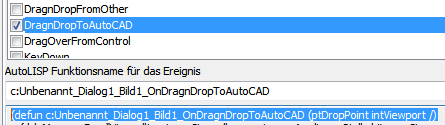
- either you copy the functionname and the needed functions into clipboard and paste it manually into your code (see image)
- or you copy the selected event to clipboard by using the Copy button
- or you add a lsp file to the current project and copy the selected event directly into your lisp file by pressing the AutoLisp button. Please have a look at the {2}.
The VarName is internally set automatically. We recommend you not to add a custom value to avoid problems addressing the controls. In principal you have both possibilities:
- Either you control each varname by your own. Then it is your task to make sure that no VarName occurs more than once. Otherwise it will cause unwanted effects. After renaming a control name you also have to change the VarName by yourself.
- Leave the VarName property empty. Then you have no problem when you are going to rename control names. This is the best way!
You can address controls via name and via VarName. We recommend you to use the VarName property. So you can test if the VarName myproject_myform_mycontrol is nil in lisp - then the form is either not loaded yet or you just have deleted the control or the control was newly added and you haven't reloaded the project yet. If you try to address a control only by name, then you have no control. It is also said that using the VarName property is faster for addressing controls because the variable already contains the control object. When using the name the control must be found at first.
Sample using adressing by name:
(foreach strControl '("pb_Cancel" "pb_Accept" "pb_Help")
(dcl_control_setvisible "MyProj" "MyForm" strControl nil)
); foreach
Sample using adressing by VarName:
(foreach oControl (list MyProj_MyForm_pb_Cancel MyProj_MyForm_pb_Accept MyProj_MyForm_pb_Help)
(dcl_control_setvisible oControl nil)
); foreach
But also can combine the use of names with the speed of VarName:
(defun control (strControl) (eval (read (strcat "MyProj_MyForm_" strControl))))
(defun invisible (oControl) (dcl_control_setvisible oControl nil))
(mapcar 'invisible '("pb_Cancel" "pb_Accept" "pb_Help"))
Hope that helps.
Fred