Started by jbuzbee ·
2011-03-29 18:20 UTC ·
12 replies · SMF topic #1608
jbuzbee
2011-03-29 18:20 UTC
Latest Build 6.0.1.3
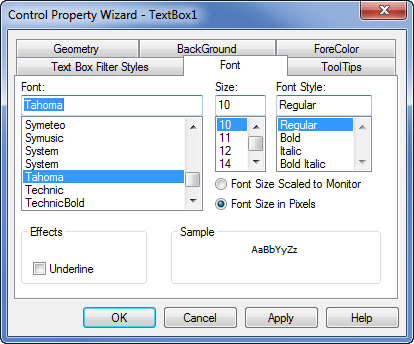
I'm attempting to make my OpenDCL forms look and feel like my old VBA hybrid forms and I noticed the VBA forms used the Tahoma font. But the only font available in OpenDCL is Tahoma Bold. Mistake or by design?
VBA From:

bazzacad
2011-03-29 18:38 UTC
Should be whatever you have installed on your system....
I have it....
jbuzbee
2011-03-29 19:09 UTC
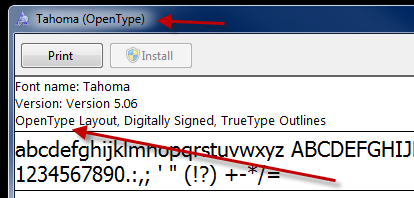
If I open up VBAIDE it's available there. If I open OpenDCL it's not. And, it's in my C:/Windows/Fonts directory.
VBAIDE Fonts:

OpenDCL Fonts:

owenwengerd
2011-03-29 19:23 UTC
Hmm, it's listed on my Windows 7 x64 system. Which version of Windows? Does it show up in the font toolbar?
jbuzbee
2011-03-29 19:45 UTC
Windows XP Pro 32 bit.
It shows up everywhere else: C:/Windows/Fonts, AutoCAD, Photoshop, Illustrator, Word, etc.
bazzacad
2011-03-29 19:49 UTC
It looks like it's an OpenType font per your screen shot... Maybe Win. XP/OpenDCL don't like OpenType as much as TrueType... Just a guess... :)
jbuzbee
2011-03-29 20:05 UTC
In C:/Windows/Fonts it's a true type. Weird.
owenwengerd
2011-03-29 20:14 UTC
If you right-click on the true-type font in control panel, do you have an option to 'Hide' it?
bazzacad
2011-03-29 23:05 UTC
author=jbuzbee link=topic=1608.msg7915#msg7915 date=1301429119 wrote:
In C:/Windows/Fonts it's a true type. Weird.
Are you sure about that?
jbuzbee
2011-03-30 01:37 UTC
That's weird, I just loaded OpenDCL on my laptop - Windows XP Pro 32 bit - and the exact same thing is happening.
If you right-click on the true-type font in control panel, do you have an option to 'Hide' it?
No
jbuzbee
2011-03-30 13:37 UTC
Never mind guys - thanks for the help. I went with Verdana. 8)
roy_043
2011-05-15 11:30 UTC
Browsing the forum I came across this topic and I had the same problem as jbuzbee (in my case with Windows XP Home 32 bit and ODCL 6.0.2.3).
Two solutions that work for me:
1.
In the font list select Tahoma Bold and in the text box above the list just remove " Bold".
2.
Make a backup copy of tahoma.ttf and tahomabd.ttf.
Deinstall both Tahoma and Tahoma Bold.
Windows XP should now reinstall these fonts automatically.
If that doesn't happen reinstall manually using the backup files.
Result: "Tahoma" now appears in the ODCL font list.
owenwengerd
2011-05-15 20:08 UTC
I think this font problem is now fixed for the next build.