Started by bazzacad ·
2011-04-11 17:25 UTC ·
5 replies · SMF topic #1614
bazzacad
2011-04-11 17:25 UTC
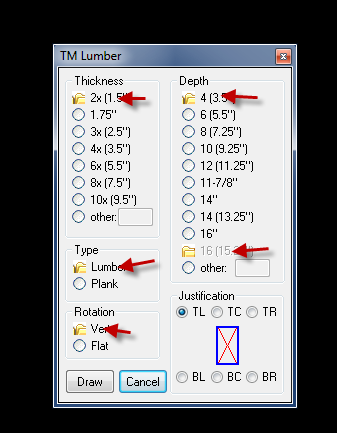
When I upgraded from an early alpha build to 6.0.2.2, I noticed all my Option Lists have folder icons for they're first item...
This is happening in multiple projects. I've tried opening them in the 6.0.2.2 studio & re-saving them, but still the same issue...
owenwengerd
2011-04-11 17:54 UTC
That is a strange one alright. What versions of AutoCAD and Windows, and what are your display settings? Is it only displaying the wrong graphic for the selected item?
bazzacad
2011-04-11 18:36 UTC
author=owenwengerd link=topic=1614.msg7939#msg7939 date=1302544441 wrote:
That is a strange one alright. What versions of AutoCAD and Windows, and what are your display settings? Is it only displaying the wrong graphic for the selected item?
I'm on Win. 7 (but some of my users are on XP & have the issue also) both on Acad 2010. I'm pretty much using the Win. 7 out of the box theme & they're using classic on XP. Yes it's the wrong graphic for the selected item, but also the the disabled one, per the right "Depth" column in the screen shot.
owenwengerd
2011-04-11 19:04 UTC
It looks like a resource DLL version is mismatched with the .arx file version. Did you install from the MSI, or manually copy files?
bazzacad
2011-04-11 19:36 UTC
Oops, I'm a very bad boy.
You should fire me. :)
Fixed thx, sorry I hope I didn't waste too much of your time...
owenwengerd
2011-04-11 19:55 UTC
No firing needed, I'll just dock your pay 50%. :)
 opt01.png (23380 bytes)