2011-07-11 19:17 UTC
Hello,
Here are some problems and questions regarding the Color ComboBox.
System:
Bricscad 11.4.2
Windows XP
OpenDCL 6.0.2.4
Files:
ColorComboTest.lsp
ColorComboTest.odcl
ColorComboTest_mouse_over_effect.gif
1.
Selecting a "Windows..." color returns the same values as selecting "ByBlock".
2.
Why not use (or: is there a way to use):
(acad_truecolordlg '(62 . 1) nil)
instead of the Windows' color dialog?
3.
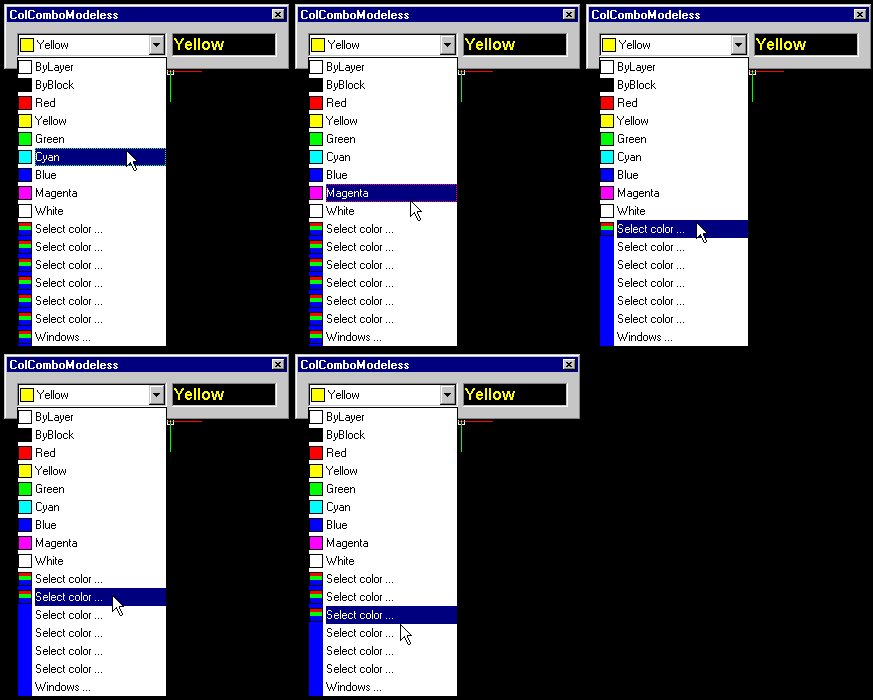
After multiple clicks on 'normal' colors, the list displays multiple entries of the "Select color..." item with a strange 'mouse-over-effect'. See image.
4.
After exiting the dialog and a restart of the COLTEST program, executing this code:
(dcl_ComboBox_DeleteItem ColorComboTest_ColComboModeless_ComboBox1 0)
multiple times until the return value is nil, or executing this code:
(dcl_ComboBox_Clear ColorComboTest_ColComboModeless_ComboBox1)
results in a list that still has two entries: "Select color..." and "Windows...". How can they be removed?
5.
Continuing after 4. (list is empty except for the "Select color..." and "Windows..." entries) pasting this code on the command line:
(dcl_ComboBox_AddColor ColorComboTest_ColComboModeless_ComboBox1 5)
results in a list starting with "blue" (no cap) followed by all the standard entries including a second "Blue" entry (with a cap). Is there a way to create a list with, for instance, just colors 251, 252, 253 and 254?
6.
After exiting the dialog and a restart of the COLTEST program, executing this code:
(dcl_ComboBox_AddColor ColorComboTest_ColComboModeless_ComboBox1 11)
will add color 11 to the top of the list. Why is it not below "white"? Note:
(dcl_Control_GetSorted ColorComboTest_ColComboModeless_ComboBox1) ; => T
7.
After exiting the dialog and a restart of the COLTEST program, executing this code:
(dcl_Control_GetText ColorComboTest_ColComboModeless_ComboBox1)
returns "3". After 'manually' selecting red the same code returns "Red".
Regards, Roy.
Here are some problems and questions regarding the Color ComboBox.
System:
Bricscad 11.4.2
Windows XP
OpenDCL 6.0.2.4
Files:
ColorComboTest.lsp
ColorComboTest.odcl
ColorComboTest_mouse_over_effect.gif
1.
Selecting a "Windows..." color returns the same values as selecting "ByBlock".
2.
Why not use (or: is there a way to use):
(acad_truecolordlg '(62 . 1) nil)
instead of the Windows' color dialog?
3.
After multiple clicks on 'normal' colors, the list displays multiple entries of the "Select color..." item with a strange 'mouse-over-effect'. See image.
4.
After exiting the dialog and a restart of the COLTEST program, executing this code:
(dcl_ComboBox_DeleteItem ColorComboTest_ColComboModeless_ComboBox1 0)
multiple times until the return value is nil, or executing this code:
(dcl_ComboBox_Clear ColorComboTest_ColComboModeless_ComboBox1)
results in a list that still has two entries: "Select color..." and "Windows...". How can they be removed?
5.
Continuing after 4. (list is empty except for the "Select color..." and "Windows..." entries) pasting this code on the command line:
(dcl_ComboBox_AddColor ColorComboTest_ColComboModeless_ComboBox1 5)
results in a list starting with "blue" (no cap) followed by all the standard entries including a second "Blue" entry (with a cap). Is there a way to create a list with, for instance, just colors 251, 252, 253 and 254?
6.
After exiting the dialog and a restart of the COLTEST program, executing this code:
(dcl_ComboBox_AddColor ColorComboTest_ColComboModeless_ComboBox1 11)
will add color 11 to the top of the list. Why is it not below "white"? Note:
(dcl_Control_GetSorted ColorComboTest_ColComboModeless_ComboBox1) ; => T
7.
After exiting the dialog and a restart of the COLTEST program, executing this code:
(dcl_Control_GetText ColorComboTest_ColComboModeless_ComboBox1)
returns "3". After 'manually' selecting red the same code returns "Red".
Regards, Roy.
Attachments
- ColorComboTest.lsp (907 bytes)
- ColorComboTest.odcl (755 bytes)
 ColorComboTest_mouse_over_effect.gif (13921 bytes)