2011-10-04 20:15 UTC
Bricscad 11.4.6
OpenDCL 6.0.2.5
Win XP
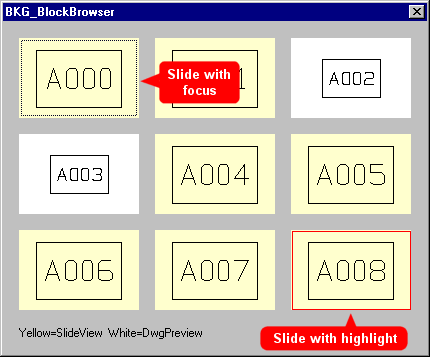
I am working on a 'dwg browser' that can display DwgPreviews and SlideViews. I notice a problem with the dotted line ('focus marker') that appears in the preview or slide that has the focus.
1.
First display of dialog: Focus marker is correctly on slide A000.
2
Hit Tab: Focus is on slide A001 but there is no focus marker.
3.
Hit Tab: Focus is on preview A002 and there is a focus marker.
4.
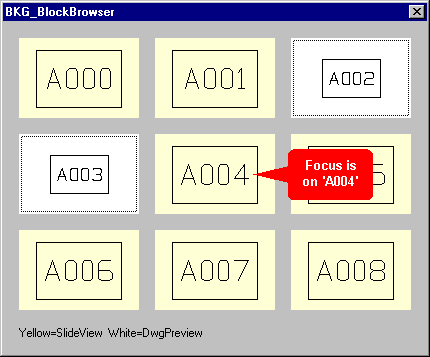
Hit Tab: Focus is on preview A003, but both A002 and A003 have a focus marker.
5.
Hit Tab: Focus is on slide A004 but there is no focus marker on the slide and the focus markers on A002 and A003 are still visible.
6.
Continue hitting Tab: Focus markers on A002 and A003 stay visible until they receive the focus again: then the markers disappears.
7.
After temporarily switching to a different application and coming back to the cad program the focus marker is correct.
OpenDCL 6.0.2.5
Win XP
I am working on a 'dwg browser' that can display DwgPreviews and SlideViews. I notice a problem with the dotted line ('focus marker') that appears in the preview or slide that has the focus.
1.
First display of dialog: Focus marker is correctly on slide A000.
2
Hit Tab: Focus is on slide A001 but there is no focus marker.
3.
Hit Tab: Focus is on preview A002 and there is a focus marker.
4.
Hit Tab: Focus is on preview A003, but both A002 and A003 have a focus marker.
5.
Hit Tab: Focus is on slide A004 but there is no focus marker on the slide and the focus markers on A002 and A003 are still visible.
6.
Continue hitting Tab: Focus markers on A002 and A003 stay visible until they receive the focus again: then the markers disappears.
7.
After temporarily switching to a different application and coming back to the cad program the focus marker is correct.
Attachments
 FocusMarkerProblem_DwgPreview_SlideView.png (2992 bytes)
- FocusMarkerProblem_DwgPreview_SlideView.zip (20523 bytes)