Boards /
Deployment /
Topic 1907
LspLoad
Started by DanW ·
2012-10-30 10:22 UTC ·
23 replies · SMF topic #1907
DanW
2012-10-30 10:22 UTC
Hi Owen,
I’ve just been experimenting with using your LspLoad for deployment (inconjunction with Inno setup). It works absolutely beautifully, except for the ”.13.brx” module is failing to load in Bricscad v13.1.6. (Windows 7 32bit).
owenwengerd
2012-10-30 15:01 UTC
I've rebuilt and updated the LspLoad.zip file; it should work now in V13.
DanW
2012-10-30 17:42 UTC
That's done the job. Many thanks.
DanW
2013-10-31 08:34 UTC
Hi Owen,
Are you able to give me an approximate indication of when BricsCAD V14 will be supported?
Many thanks
owenwengerd
2013-10-31 14:41 UTC
I should have time to work on it this afternoon, so look for an update later today.
DanW
2013-10-31 14:43 UTC
Awesome. Thanks Owen!
DanW
2016-11-04 10:20 UTC
Hi Owen,
Are you able to give an approx indication for when Lspload will support BricsCAD V17?
Many thanks (as ever!)
owenwengerd
2016-11-04 16:05 UTC
I just started today working on updating my own software. I'll try to get LspLoad updated today yet.
DanW
2016-11-07 09:04 UTC
Just downloaded. Thank you!!! :)
DanW
2016-11-09 17:29 UTC
Hi Owen,
Thanks again for this, it works, however starting with BricsCAD V17 (17.1.04 x64) - the following output is appearing on the command line at start up:
: (LspLoad-MyAppLoad)nil
: (vl-load-all "c:/Program Files/MyApp/Loader/MyAppLoad")(princ)
CADwiesel
2016-11-11 09:50 UTC
in BricsCAD Torsten includet an special Funktion some Jears ago. Its called vl-list-loaded-lisp. It determines where an loaded Funktion is stored. In coupple with the file on_doc_load.lsp you can create your own autoloader for Lisp or des Files.
And new in V17 is the demand-load functionality which was bevore only for *.brx and *.dll - now also usable for Lisp and des Files.
DanW
2016-11-11 17:07 UTC
Hi CADwiesel,
That is most interesting, thank you very much indeed for your post.
Bricsys deliver again! :)
diogenes
2016-11-16 14:47 UTC
Thank you very much for the application, Owen. It is very useful. Just one question: is it possible that the digital signature data does not appear?
owenwengerd
2016-11-16 21:20 UTC
author=diogenes link=topic=1907.msg12225#msg12225 date=1479307672 wrote:
is it possible that the digital signature data does not appear?
Sorry, I don't understand the question. Can you rephrase please?
diogenes
2016-11-18 08:55 UTC
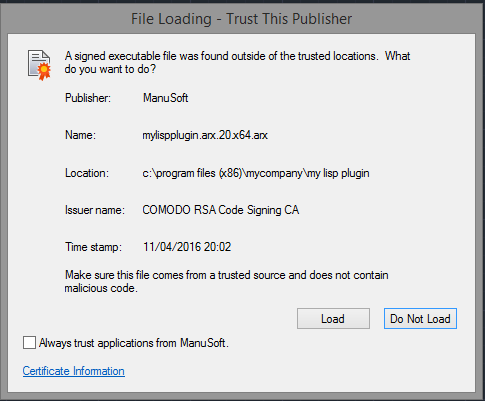
Hi, Owen. I've done the steps explained in the MyLispPlugin application. In Autocad 2016 and secureload = 1, when I start Autocad, it asks for confirmation to load MyLispPlugin and the following image appears:

Could this message not appear?
Thank you for your work and greetings
DanW
2016-11-18 10:51 UTC
Hi diogenes,
For AutoCAD 2014 through to AutoCAD 2016, you would have to either install lsploader into a "Trusted Path" or alternatively create a lsploader.bundle in Autodesk's Applications Plugins folder. See http://adndevblog.typepad.com/autocad/2013/01/autodesk-autoloader-white-paper.html.
Happily as from AutoCAD 2017, the Program Files folder tree is added to the Trusted Paths as a matter of course.
diogenes
2016-11-18 10:57 UTC
Again, thank you very much Owen
owenwengerd
2016-11-18 16:32 UTC
author=diogenes link=topic=1907.msg12235#msg12235 date=1479459328 wrote:
Could this message not appear?
The message is designed to give the end user an ability to block unauthorized code from executing. As already mentioned, there are ways your installer can configure the system so that the application code is trusted, but security is usually best left to Autodesk and the end user.
diogenes
2016-11-18 19:37 UTC
Thanks Owen.
I read in the material of Autodesk what you comment and it is totally logical, although for some users it is complex everything that is not to "plug and play", ;D ;D ;D
regards
Peter2
2016-11-20 11:10 UTC
I would say that this is not a problem of the signature, it is a result of your settings of "trusted paths" inside AutoCAD. If it is set "right" there will be no such message - neither for signed nor for unsigned files.
CADwiesel
2016-11-28 09:07 UTC
This message will always prompted, if an not registered Application wants to be loaded. You can change this eveb if you set secureload to 0 or set this application on the list of trusted files. See sysvar TRUSTEDPATHS
DanW
2021-10-29 15:55 UTC
Hi Owen,
Any chance of adding support for BricsCAD V22 to your lovely LspLoader?
With much thanks
Dan
owenwengerd
2021-10-29 21:29 UTC
LspLoad has been updated with BricsCAD V22 support.
DanW
2021-10-30 09:07 UTC
Hi Owen, much appreciated. Thank you :)