Started by Peter2 ·
2013-07-25 12:21 UTC ·
7 replies · SMF topic #1986
Peter2
2013-07-25 12:21 UTC
I have a combo-field where I use
Title: "This is my title"
List: "Item 1|Item 2|Item 3"
Starting the dialogue I always see the title and have to click to see my Items.
Is there an internal way to display the list immediately? Or do I have to use LSP for correct display?
owenwengerd
2013-07-25 19:55 UTC
I don't think there's any way to programmatically open the dropdown. You can of course use a simple combo that always displays the list as a listbox.
Peter2
2013-07-25 19:59 UTC
author=owenwengerd link=topic=1986.msg9790#msg9790 date=1374782106 wrote:
.....You can of course use a simple combo that always displays the list as a listbox.
??? ???
I think I have to take a little more time to understand it .. (as said above, it is my first small project).
owenwengerd
2013-07-26 04:22 UTC
To clarify, by "simple combo" I meant a combo box control with Style set to 1 - Simple. Just now when I tested this, I inserted a combo control, changed the Style property, changed the List property to a|b|c|d, then tried to resize the control so it will display the list. It was "stuck" as a standard combo. I had to close the form window and reopen it, then the simple combo control could be resized to display the list. I hope that helps .
Peter2
2013-07-26 07:26 UTC
Hello Owen
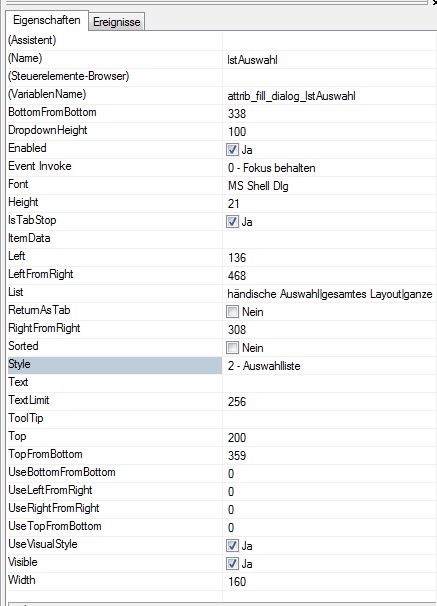
thanks for your reply. Now I attached two screenshots to explain what I mean:
Image 1 shows the properties: I have Style 2, no title and three items.
Image 2 shows the dialogue when it is started: The list is empty because there is no title (if I enter a title the title is displayed).
Question:
When the dialogue starts I don't want to see the (empty or existing) title, I want to see the first item of my list.
-> What to do?
Thank you.
owenwengerd
2013-07-26 16:07 UTC
I'm not sure I understand completely, but I think that if you set the Text property equal to a value in the list, then that value should be automatically selected in the list when the combo is initialized.
Peter2
2013-07-26 17:00 UTC
author=owenwengerd link=topic=1986.msg9797#msg9797 date=1374854828 wrote:
... if you set the Text property equal to a value in the list, then that value should be automatically selected in the list when the combo is initialized.
Yes, this is what I want. I thought (hoped) that there is a property like "Display list items instead of title", but I will use this solution.
Thanks and have a fine weekend.
fred_tomke
2013-08-05 04:24 UTC
Hi, Peter, there was a similar question in the past how to open a DropDown list automatically.
You only have to set the focus to the combobox and to send the Cursor Down key.
Regards, Fred