Started by khann ·
2013-10-07 08:16 UTC ·
10 replies · SMF topic #2037
khann
2013-10-07 08:16 UTC
Hi,
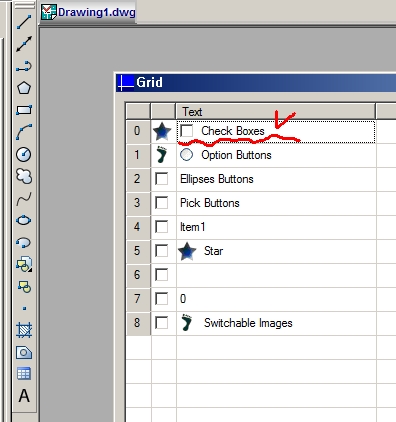
I'm trying to edit the label text of "Checkbox" style in grid.
I could not get the proper solution.
Is it possible?
owenwengerd
2013-10-07 14:06 UTC
What exactly did you try, and how did it fail?
khann
2013-10-08 06:13 UTC
Hi, Owen.
As you know, this is MasterDemo's grid sample.
I want to know how to change the text
"Check Boxes" itself of "CheckBox Style" in grid at runtime.
Thanks. :)
owenwengerd
2013-10-08 15:39 UTC
khann
2013-10-09 04:52 UTC
Thanks, Owen for your reply.
But it's not what I thought.
I need "CheckBox" style to get the user checked the cell or not
and need to edit the label text of the cell as "String" or "Integer" style.
owenwengerd
2013-10-09 05:03 UTC
Sorry, I don't understand the problem. What exactly is the issue with Grid_SetCellText with a Checkbox cell style?
khann
2013-10-09 06:54 UTC
It's okey.
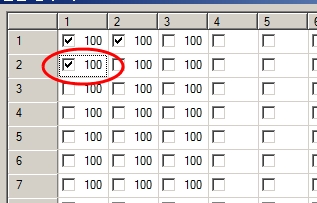
Yes, I want the "CheckBox" style can edit label text when clicked the cell just like "String" style.
:-[
owenwengerd
2013-10-09 14:01 UTC
Ah, I see now. For that, perhaps you can leave the checkbox and accompanying text in two separate columns.
khann
2013-10-10 01:17 UTC
Thanks, Owen.
That may be one solution.
not to use two columns, I consider the combination of changing between "Checkbox" and "String" style with MouseUp or BeginLabelEdit Event.
But I'm not sure it works as I wish. ::)
fred_tomke
2013-10-11 07:25 UTC
Hi, khann, I would like to encourage you to have a try. Just keep in mind that a cell can only have a single style: either text input or checkbox; either text input or button and so on. That's why I also used multiple colums for different input types of each row.
Regards, Fred
khann
2013-10-13 02:04 UTC
Thank you very much. Fred.
:)
Still I'm trying, not only this and there rises some other ideas to get my goal.
I think post the sample, if succeed.
Your reply is my great energizer. ;)
 edit grid checkbox text.jpg (54722 bytes)