2013-12-10 18:16 UTC
???
Hi all,
I'm trying to add a ribbon button that will allow the user to toggle the appearance of a palette. The first time it's clicked the palette should be shown. Each time it is clicked after the first, it should toggle ( show / hide ) the palette. I would prefer that the palette be set to an Anchored Auto-hide state if possible, instead of closed, but I'll take what I can get.
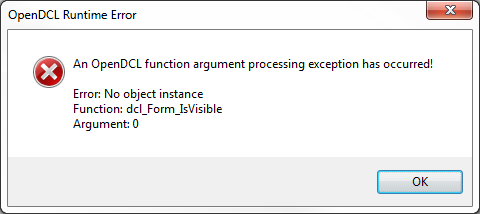
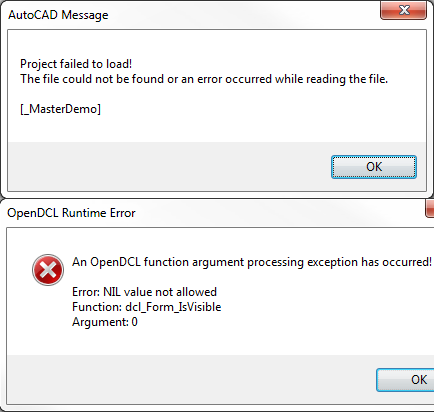
Below is the code that I tried and it gives me an automation error. Undoubtedly, the error is because the "DCL_FORM_ISVISIBLE" function returns an error if the form is not visible. <- that's as far as I get. What next?
(DEFUN c:CNTRL ()
(DCL_PROJECT_LOAD "CNTRL-PNL" T)
(IF (DCL_FORM_ISVISIBLE CNTRL-PNL_CPL-CAD)
(DCL_FORM_CLOSE CNTRL-PNL_CPL-CAD)
(DCL_FORM_SHOW CNTRL-PNL_CPL-CAD)
)
(PRINC)
)
Thank you in advance for any help.
Hi all,
I'm trying to add a ribbon button that will allow the user to toggle the appearance of a palette. The first time it's clicked the palette should be shown. Each time it is clicked after the first, it should toggle ( show / hide ) the palette. I would prefer that the palette be set to an Anchored Auto-hide state if possible, instead of closed, but I'll take what I can get.
Below is the code that I tried and it gives me an automation error. Undoubtedly, the error is because the "DCL_FORM_ISVISIBLE" function returns an error if the form is not visible. <- that's as far as I get. What next?
(DEFUN c:CNTRL ()
(DCL_PROJECT_LOAD "CNTRL-PNL" T)
(IF (DCL_FORM_ISVISIBLE CNTRL-PNL_CPL-CAD)
(DCL_FORM_CLOSE CNTRL-PNL_CPL-CAD)
(DCL_FORM_SHOW CNTRL-PNL_CPL-CAD)
)
(PRINC)
)
Thank you in advance for any help.