Background color of a TabStrip

Started by Emiliano · 2014-03-15 17:46 UTC · 11 replies · SMF topic #2109

I've searched everywhere but I could not find it.
I want to change the background color of a TabStrip, if I select TabStrip1 between its properties have not found the background color.
If I select the individual tabs, the properties are empty  :'(

how do I change the background color of a TabStrip?

Thanks in advance

Sorry, I don't believe it is possible to change tab strip background color.
Lately I want to do many things that you can not do ...  :'( :'( :'(
Hi, Emiliano, how are you? Hope you are not sad anymore :) . Look OpenDCL even allows you building a generic "tab control" using picture box.

Regards, Fred
Attachments
author=Fred Tomke link=topic=2109.msg10469#msg10469 date=1395136391 wrote:
Hi, Emiliano, how are you? Hope you are not sad anymore :) . Look OpenDCL even allows you building a generic "tab control" using picture box.

Regards, Fred


Hello Fred,
I'm fine thanks :)

Could you explain better, or send me an example?
thanks
Hi, Emiliano,

I haven't just a small sample, but I can give you some hints:
1. Draw a picture box with -16 background color.
2. Activate OnPaint and OnMouseDown event of the picturebox
3. Write a little code:


(defun update_tab (useTree)
  (if useTree
    (progn
      (dcl_PictureBox_DrawSolidRect PictureBox
(list (list 6 0 55 11 -6)))
      (dcl_PictureBox_DrawWrappedText PictureBox
(list (list 0 0 65 -19 -6 "Hierarchie" 1) (list 60 0 65 -19 -16 "Liste" 1)))
      (dcl_PictureBox_DrawLine PictureBox
(list (list 61 0 66 12 0) (list 66 12 120 12 0) (list 120 12 125 0 0)
      (list 2 0 6 11 -6) (list 3 0 6 11 -6) (list 4 0 6 11 -6) (list 5 0 6 11 -6)
      (list 60 11 61 0 -6) (list 60 11 62 0 -6) (list 60 11 63 0 -6) (list 60 11 64 0 -6)
      (list 1 0 6 12 0) (list 6 12 60 12 0) (list 60 12 65 0 0)))
    ); progn
    (progn
      (dcl_PictureBox_DrawSolidRect PictureBox
(list (list 66 0 55 11 -6)))
      (dcl_PictureBox_DrawWrappedText PictureBox
(list (list 0 0 65 -19 -16 "Hierarchie" 1) (list 60 0 65 -19 -6 "Liste" 1)))
      (dcl_PictureBox_DrawLine PictureBox
(list (list 1 0 6 12 0) (list 6 12 60 12 0) (list 60 12 65 0 0)
      (list 62 0 66 11 -6) (list 63 0 66 11 -6) (list 64 0 66 11 -6) (list 65 0 66 11 -6)
      (list 120 11 121 0 -6) (list 120 11 122 0 -6) (list 120 11 123 0 -6) (list 120 11 124 0 -6)
      (list 61 0 66 12 0) (list 66 12 120 12 0) (list 120 12 125 0 0)))
    ); progn
  ); if
); update_tab

(defun c:PictureBox_OnMouseDown (intButton intFlags intX intY / useTree)
  (setq useTree (<= intX 76))
  (update_tab useTree)
  (dcl_control_setvisible project_form_tree useTree)
  (dcl_control_setvisible project_form_listview (not useTree))
); c:PictureBox_OnMouseDown

(defun c:Picturebox_OnPaint (isHasFocus /)
  (update_tab (dcl_Control_GetVisible project_form_tree))
); c:Picturebox_OnPaint


The update_tab function contains your design of tab. Use Images, Solids, Texts, Hatches and so on.
That's all. :)

Regards, Fred
author=Fred Tomke link=topic=2109.msg10471#msg10471 date=1395150003 wrote:

The update_tab function contains your design of tab. Use Images, Solids, Texts, Hatches and so on.
That's all. :)

Regards, Fred


I still do not understand what this code does  :-[
Hi, the code shows how repainting a control is working.
Whenever a control has to be repainted (when moving an other form over the control or moving the form itself), the OnPaint event is fired.
In the OnPaint event handler the update_tab function will be called to redraw the tabs depending on the last tab selection (left or right).
Whenever a user clicked into the picturebox, the OnMouseDown event handler is called to check whether the user has clicked the left or the right tab what can be caught by querying x-coordinate of the mouse.

Redrawing the tab control means to draw each single line, solid hatch an text.
I recomment you to have a look at {2}, also made by pure picture box.
Hope that helps.

Regards, Fred
Sorry Fred, but I do not understand how this can be useful to solve my problem.
Maybe I do not understand because of my poor English or lack of experience with OpenDCL.

I just want to change the background color of a TabStrip.
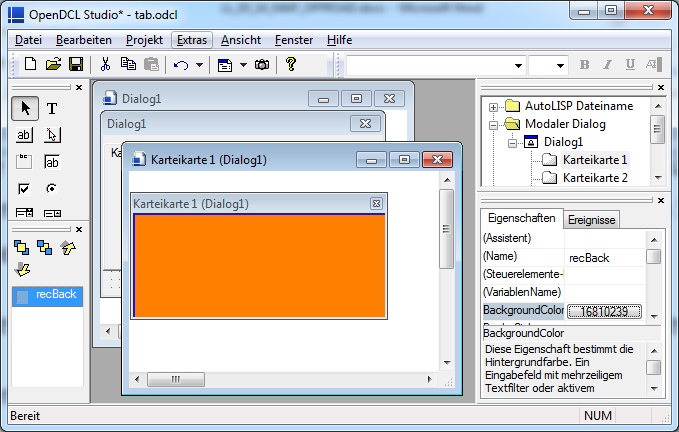
Currently I can color the background of Controlbar that houses it, but I can not change the background color of the TabStrip.
It is not a problem repaint, but that property does not exist "Background Color" in TabStrip

See attached image
Attachments
Hi, as long OpenDCL supports z-tab-order you can draw a rectangle in the back of each tab item.
I use it this way in some cases.

Regards, Fred
Attachments
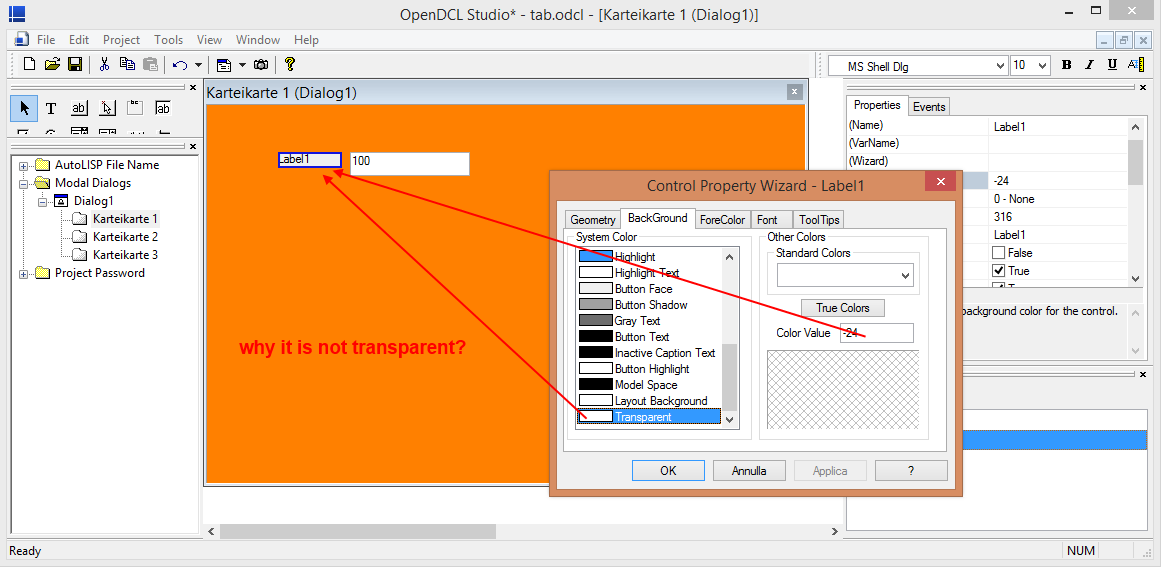
Ok I had thought of this solution, but the probleme is I can not assign transparency to the added controls above.
See attached image.

Attachments
Some controls do not support transparency. In addition, visual styles can override a control's background color. In the latter case, you can set 'Use Visual Style' to False. In the former case, the only solution is to use a different control (such as Picture Box with custom painting as Fred already described for tab strips).