Boards /
Runtime/AutoLISP /
Topic 2135
custom ddedit access violation
Started by andrew.nao1 ·
2014-04-30 15:27 UTC ·
21 replies · SMF topic #2135
andrew.nao1
2014-04-30 15:27 UTC
im assuming this error is caused by an issue with the current build 8.0.0.6 and using 2015
using it in 2014 and i have no problems
can someone confirm if this is a opendcl issue or do i have to check thru my code for issues?
jbuzbee
2014-04-30 15:57 UTC
Can you post a reproducible project for us to test?
jb
andrew.nao1
2014-04-30 17:30 UTC
here ya go
i open the editor, save the files again, and close it.
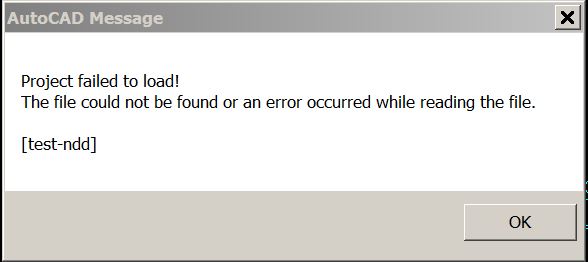
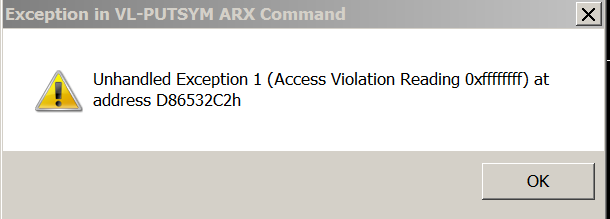
re-run the code and now i get this
for the record, my other dcl projects work just fine.
its just this one and one very similar to this that do not.
andrew.nao1
2014-04-30 18:35 UTC
im getting the failed to load message on acad 2014 now.
the attached files are shared files 1 station is using 2015 and 1 station is 2014
ok so i fixed my issue with 2014, i just copied backup .odcl files made with version 7.0.0.12
but i still have the issue with 2015
owenwengerd
2014-05-01 03:22 UTC
I looked at your code, but I didn't try to load it because I see dependencies on DOSLIB and hard coded file paths. Please create a new project from scratch with only the bare minimum required for me to reproduce the problem.
andrew.nao1
2014-05-01 13:28 UTC
Owen,
try the attached
thanks
owenwengerd
2014-05-01 14:35 UTC
What are the steps to reproduce the problem?
andrew.nao1
2014-05-01 14:39 UTC
i have it set to run on double clicking any piece of text, not mtext, just regular text
owenwengerd
2014-05-01 14:46 UTC
I need detailed steps starting from scratch in a clean vanilla AutoCAD.
andrew.nao1
2014-05-01 15:00 UTC
under the CUI editor > double click actions > text > the command to load the file (load "tt-ndd)
a piece of text on the screen, double click it, the project sometimes opens, when it does it allows me to edit it and then closes, then opens again and then i cant close it by clicking on "close" so i click the X in the corner and thats when the access violation pops up
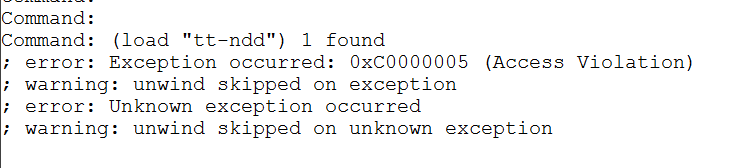
even if i just run it without using the double click. i get that error
owenwengerd
2014-05-01 16:09 UTC
Please try to simplify these steps to eliminate the need to edit the CUI file.
andrew.nao1
2014-05-02 13:20 UTC
just load it up
and click on a piece of regular text
i cant give any more simple than that.
its just a glorified ddedit, works the same way ddedit does.
there are no special steps
owenwengerd
2014-05-02 15:15 UTC
I am limited on time today, but will try to look at this again tomorrow. It seems like you are having trouble understanding what I need to reproduce the problem, and this has resulted in wasted time and you stuck with no resolution. Steps to reproduce should be clear, complete, unambiguous, and use only out-of-the-box commands to the extent possible. Here is an example (I don't know if this is correct in your case, it's just an example based on my best guess by filling in the pieces you left out):
1) Start AutoCAD.
2) Create a text entity with the TEXT command anywhere on screen.
3) Enter (load "test-lisp") to load the test code.
4) When prompted to select text, select the text entity.
5) Here it crashes with a fatal error, as per attached screen capture.
andrew.nao1
2014-05-02 15:18 UTC
author=owenwengerd link=topic=2135.msg10668#msg10668 date=1399043712 wrote:
I am limited on time today, but will try to look at this again tomorrow. It seems like you are having trouble understanding what I need to reproduce the problem, and this has resulted in wasted time and you stuck with no resolution. Steps to reproduce should be clear, complete, unambiguous, and use only out-of-the-box commands to the extent possible. Here is an example (I don't know if this is correct in your case, it's just an example based on my best guess by filling in the pieces you left out):
1) Start AutoCAD.
2) Create a text entity with the TEXT command anywhere on screen.
3) Enter (load "test-lisp") to load the test code.
4) When prompted to select text, select the text entity.
5) Here it crashes with a fatal error, as per attached screen capture.
yes sir
i also noticed you changed the code up a little bit.
example
version 8
(dcl-Control-GetText tn/Form1/TextBox1)
version 7
(dcl_Control_GetText tn_Form1_TextBox1)
could this be the issue?
owenwengerd
2014-05-02 15:36 UTC
author=andrew.nao1 link=topic=2135.msg10670#msg10670 date=1399043905 wrote:
could this be the issue?
Very unlikely, but anything is possible.
andrew.nao1
2014-05-02 16:11 UTC
ok.
well i made a stripped, stripped down version (removed all lsp functions and left in odcl code and the dialog wont even close when you click on the "cancel" button
owenwengerd
2014-05-03 21:27 UTC
author=owenwengerd link=topic=2135.msg10668#msg10668 date=1399043712 wrote:
1) Start AutoCAD.
2) Create a text entity with the TEXT command anywhere on screen.
3) Enter (load "test-lisp") to load the test code.
4) When prompted to select text, select the text entity.
5) Here it crashes with a fatal error, as per attached screen capture.
I am able to reproduce the problem with the following changes to the steps I deduced above:
5) Press the button.
6) Press the button a second time.
7) Crash.
owenwengerd
2014-05-03 21:39 UTC
author=andrew.nao1 link=topic=2135.msg10673#msg10673 date=1399047104 wrote:
... the dialog wont even close when you click on the "cancel" button
I cannot reproduce this. I loaded the .lsp, clicked on , and the dialog closed.
owenwengerd
2014-05-03 21:51 UTC
author=owenwengerd link=topic=2135.msg10680#msg10680 date=1399152445 wrote:
[quote author=owenwengerd link=topic=2135.msg10668#msg10668 date=1399043712]
1) Start AutoCAD.
2) Create a text entity with the TEXT command anywhere on screen.
3) Enter (load "test-lisp") to load the test code.
4) When prompted to select text, select the text entity.
5) Here it crashes with a fatal error, as per attached screen capture.
I am able to reproduce the problem with the following changes to the steps I deduced above:
5) Press the button.
6) Press the button a second time.
7) Crash.
This crash is caused by your use of (command). Changing it to (command-s) fixes the problem for me in AutoCAD 2015. See
{2}.
andrew.nao1
2014-05-05 13:43 UTC
i will try this out and get back to you
andrew.nao1
2014-05-05 16:05 UTC
author=owenwengerd link=topic=2135.msg10682#msg10682 date=1399153895 wrote:
This crash is caused by your use of (command). Changing it to (command-s) fixes the problem for me in AutoCAD 2015. See {2}.
ok here is whats happening.
all work stations have build 8.0.0.6
my station is the only one with 2015
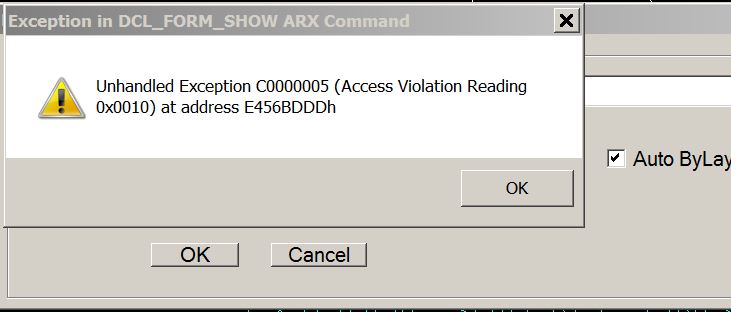
the changing "command" to "command-s" works for me in 2015, however when the file is loaded in a 2014 station i get the following errors. this error is consistant with all my 2014 work stations
when i click ok, the error just loops and i have to ctrl-alt-del to kill the process
edit: when i change the "command-s" back to "command" the errors go away in 2014 but are back for me in 2015
andrew.nao1
2014-05-05 17:17 UTC
i didnt know command-s was an autocad thing.
sorry Owen... i just have to find a way around that for now
 1Capture.JPG (36436 bytes)