dcl-Control-SetColumnHeader does not work for ListView?

Started by roy_043 · 2014-05-27 21:21 UTC · 7 replies · SMF topic #2143

I can't get dcl-Control-SetColumnHeader to work for a ListView control.
See attached .lsp and .odcl files. Am I missing something or is this a bug?

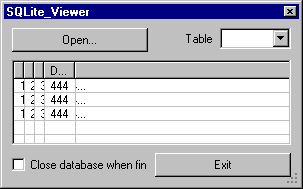
The image was created with the SetColumnHeader property set to true in the .odcl file. It is there to demonstrate a different issue: The ellipses (...) and the rightmost pixels of characters appear to be in a different column when a column is resized.
Attachments
Are you trying to change it at runtime? I'm pretty sure this is a design-time only property. How can I reproduce the column spillover problem?
author=owenwengerd link=topic=2143.msg10727#msg10727 date=1401243454 wrote:
Are you trying to change it at runtime? I'm pretty sure this is a design-time only property.
Right. But according to the docs dcl-Control-SetColumnHeader applies to Grid and List View which is probably why the function is named dcl-Control-...

On that theme:
With so many similarities between Grid and List View why aren't more function named dcl-Control-...?
Examples:
dcl-Grid-GetColumnCount
dcl-ListView-GetColumnCount
dcl-Grid-DeleteColumn
dcl-ListView-DeleteColumn

author=owenwengerd link=topic=2143.msg10727#msg10727 date=1401243454 wrote:How can I reproduce the column spillover problem?
Open the .odcl file and set the ColumnHeader property to true for the List View.
Call the _.Opendcl command (I accidentally stripped that from the .lsp file).
Load the .lsp file.
Start the c:SQLite_Viewer function and resize the 4th column.
author=roy_043 link=topic=2143.msg10728#msg10728 date=1401261002 wrote:
But according to the docs dcl-Control-SetColumnHeader applies to Grid and List View which is probably why the function is named dcl-Control-...


The prefix is due to the fact it's a property. Methods are specific to the control type; properties are "owned" by the control base class.

The column spillover issue may be a graphics driver related problem. I am not able to reproduce it on Windows 7 64-bit with a NVIDIA GeForce GT 430.
author=owenwengerd link=topic=2143.msg10731#msg10731 date=1401287503 wrote:
The prefix is due to the fact it's a property. Methods are specific to the control type; properties are "owned" by the control base class.
I didn't know that. Thanks for the clarification.

author=owenwengerd link=topic=2143.msg10731#msg10731 date=1401287503 wrote:
The column spillover issue may be a graphics driver related problem. I am not able to reproduce it on Windows 7 64-bit with a NVIDIA GeForce GT 430.
I understand. It's not a big issue anyway, I just happened to bump into it.
Regarding the 'column spillover': I forgot to mention that I use BricsCAD. I don't know if that plays a role.
author=roy_043 link=topic=2143.msg10738#msg10738 date=1401352854 wrote:
Regarding the 'column spillover': I forgot to mention that I use BricsCAD. I don't know if that plays a role.


There is no difference on my system whether testing in AutoCAD or Bricscad.
OK, thanks for checking.