Started by velasquez ·
2014-11-21 23:37 UTC ·
14 replies · SMF topic #2206
velasquez
2014-11-21 23:37 UTC
Hello Owen.
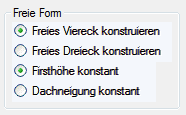
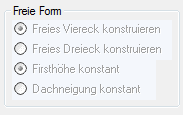
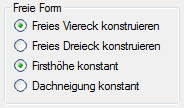
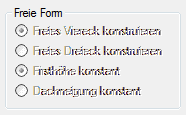
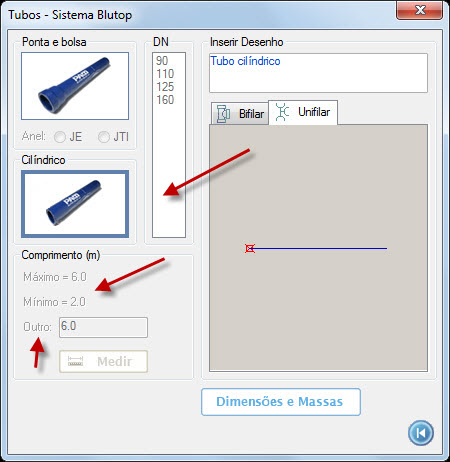
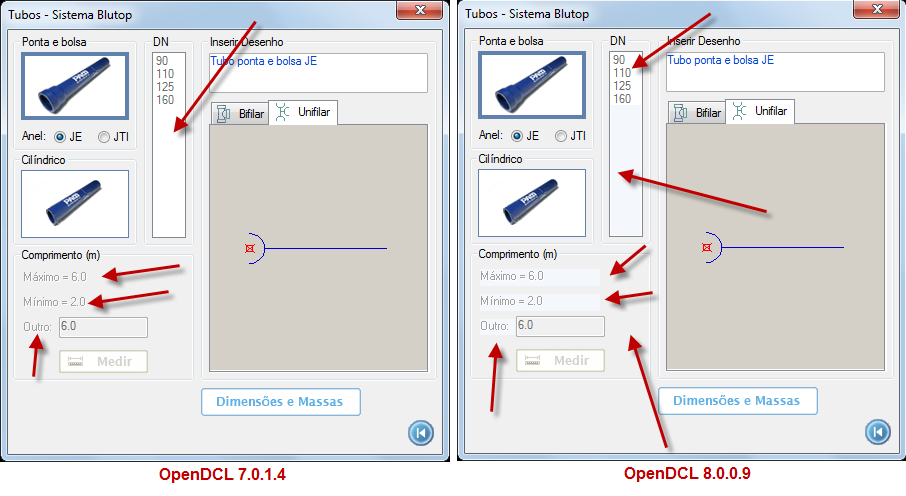
There is a difference in the appearance of a control OpenDCL disabled in 7.0.1.4 and 8.0.0.9 OpenDCL.
Is there a way to work around this?
I made no change in the project 7.0.1.4 only saved in the new version.
Thanks.
owenwengerd
2014-11-22 04:48 UTC
Do you see the problem if you use the original .odcl file in OpenDCL 8 runtime? Can you attach a simple sample that I can use to reproduce the problem here?
fred_tomke
2014-11-22 12:12 UTC
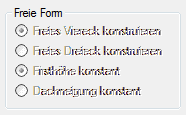
Hi, I can reproduce this in AutoCAD 2015 with controls with BackColor = -24. Change them to -16 (3D-Objects/Button). But then font color may not be rendered properly. I added 4 cases for optionlist.
Fred
velasquez
2014-11-22 13:53 UTC
author=owenwengerd link=topic=2206.msg11077#msg11077 date=1416631731 wrote:
Do you see the problem if you use the original .odcl file in OpenDCL 8 runtime? Can you attach a simple sample that I can use to reproduce the problem here?
Hello Owen,
I posted the example you asked.
I worked with OpenDCL Studio 8.0.0.9 and runtime.
I tested with AutoCAD 2010 2012 2013 and 2015 with the same result.
velasquez
2014-11-22 13:56 UTC
author=Fred Tomke link=topic=2206.msg11079#msg11079 date=1416658348 wrote:
Hi, I can reproduce this in AutoCAD 2015 with controls with BackColor = -24. Change them to -16 (3D-Objects/Button). But then font color may not be rendered properly. I added 4 cases for optionlist.
Fred
Thanks for your help Fred.
velasquez
owenwengerd
2014-11-22 17:08 UTC
author=velasquez link=topic=2206.msg11082#msg11082 date=1416664417 wrote:
I posted the example you asked.
Unfortunately the sample does not load in OpenDCL 7. I will try to create one here.
owenwengerd
2014-11-22 17:21 UTC
I tested your sample in OpenDCL 8, but I do not see the problem with background color on my system. It looks like your dialog background color is different, so probably you have a different Windows theme. Do you have aero enabled? Which theme?
velasquez
2014-11-22 19:31 UTC
author=owenwengerd link=topic=2206.msg11085#msg11085 date=1416676890 wrote:
I tested your sample in OpenDCL 8, but I do not see the problem with background color on my system. It looks like your dialog background color is different, so probably you have a different Windows theme. Do you have aero enabled? Which theme?
The theme I use is the same as always I used to OpenDCL 7 ....
I do not even temho areo on my Windows 7 Home Basic.
I do not think you need to create an example because the problem only happens to version 8 ...
owenwengerd
2014-11-22 19:40 UTC
I created a sample, and was able to reproduce the problem. It happens when themes are enabled.
I found a flaw in the OpenDCL code for determining when themes are active for a given control. The flaw affects Check Boc, Frame, Label, and Radio Button controls. This is now fixed for the next build.
Fred, it seems the problem with the option list control is a different problem.
velasquez
2014-11-22 21:21 UTC
author=Fred Tomke link=topic=2206.msg11079#msg11079 date=1416658348 wrote:
Hi, I can reproduce this in AutoCAD 2015 with controls with BackColor = -24. Change them to -16 (3D-Objects/Button). But then font color may not be rendered properly. I added 4 cases for optionlist.
Fred
Hello Fred,
I skirted the problem with the image below using dcl_control_redraw.
Have you tried?
velasquez
2014-11-22 21:24 UTC
author=owenwengerd link=topic=2206.msg11087#msg11087 date=1416685217 wrote:
I created a sample, and was able to reproduce the problem. It happens when themes are enabled.
I found a flaw in the OpenDCL code for determining when themes are active for a given control. The flaw affects Check Boc, Frame, Label, and Radio Button controls. This is now fixed for the next build.
Fred, it seems the problem with the option list control is a different problem.
Thanks Owen,
You know when it will launch the next building?
owenwengerd
2014-11-22 21:48 UTC
After some testing, I found that the option list problem happens on only one of my two monitors. If I move the test dialog between monitors it looks correct on one, and wrong on the other. I have made a small change that should fix that problem as well. This change is also related to themes, and the fix affects other controls as well (specifically on the the listbox I noticed a change -- other controls may not have any noticeable change).
I don't know yet when the next build will be uploaded. If it is critically important for you to get the fix, I can upload it soon.
velasquez
2014-11-23 11:13 UTC
author=owenwengerd link=topic=2206.msg11090#msg11090 date=1416692913 wrote:
After some testing, I found that the option list problem happens on only one of my two monitors. If I move the test dialog between monitors it looks correct on one, and wrong on the other. I have made a small change that should fix that problem as well. This change is also related to themes, and the fix affects other controls as well (specifically on the the listbox I noticed a change -- other controls may not have any noticeable change).
I don't know yet when the next build will be uploaded. If it is critically important for you to get the fix, I can upload it soon.
Thank you for your attention Owen.
I need to update a large project for AutoCAD 2015 and all forms appear with the problem with disabled = False.
Fix it is critically important for me.
owenwengerd
2014-11-25 16:29 UTC
Please test Alpha 10 and verify that your controls display as expected.
velasquez
2014-11-25 21:20 UTC
author=owenwengerd link=topic=2206.msg11103#msg11103 date=1416932997 wrote:
Please test Alpha 10 and verify that your controls display as expected.
Hello Owen
I tested Alpha 10 and the controls are displayed with no problem as they are expected.
Thank you for your fast response.
 enabled_FALSE.png (71986 bytes)