Boards /
Runtime/AutoLISP /
Topic 2261
8.0.0.13 opendcldemo shows nothing?
Started by khann ·
2015-04-23 07:01 UTC ·
10 replies · SMF topic #2261
khann
2015-04-23 07:01 UTC
Hi,
I've just changed my OPENDCL 7.xx to 8.0.0.13
In Acad, loaded [ @AllSamples.lsp ] file.
"Command: AP APPLOAD @AllSamples.lsp successfully loaded"
But "opendcldemo" command shows nothing.
What did i do wrong?
anything else to do?
(Win 7, 64x. acadmap 2014)
khann
2015-04-23 07:09 UTC
I feel something odds.
In VisualLisp Editor, when click [ Load edit window ]
prints like this :
; 0 forms loaded from #
_$
_$
and
Check edit window
prints like this :
[CHECKING TEXT @AllSamples.lsp loading...]
; Check done.
it didnot show any function's names.
:-[
owenwengerd
2015-04-23 17:10 UTC
What happens if you restart AutoCAD and just enter the OPENDCLDEMO command without first loading the lisp file?
khann
2015-04-24 01:52 UTC
Well,
After installed, it seems basically loaded.
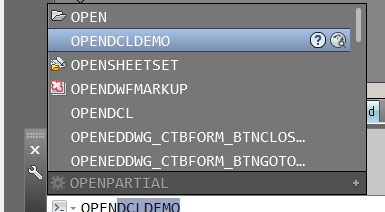
command bar shows the OPENDCLDEMO, like the image.
But it shows nothing...!
::)
owenwengerd
2015-04-24 03:24 UTC
Maybe it is displayed off screen, or maybe it is very small and you are overlooking it?
khann
2015-04-24 11:08 UTC
I returned to VisualLisp Editor and selected all the lines of @Allsamples.lsp files then loaded manually.
Visual LISP Consle window lists nothing.
But when only select from
(setq *OdclAllSamples ~ )
...
(princ "\nOPENDCLDEMO\n")
(C:OPENDCLDEMO)
not include the comments parts.
Visual LISP Consle window lists these 5 lines.
(("Basic" ... "")) <- long list.
C:OPENDCLDEMO
*ODCL:RUNSAMPLE
*ODCL:VANISH
*ODCL:UPDATECHECK
how it could be like this?
Hmm.... ???
khann
2015-04-24 11:30 UTC
I tested the pure @Allsample.lsp file.
When delete all the comments, it just shows the new body.
But faced another wall.
Each sample did not appear how ever clicking the name's column, Misc to Combo Box Lab.
Only last two VLX1, 2 pops up.
And
Selection -> malformed list on ipnut error alerting. (same at 2014, 2005map)
Slider -> ADS request error alerting. (this at 2014map)
(this from 2005map)
-> An OpenDCL function argument processing exception has occurred!
Error : NIL value not allowed
Function:dcl-ListBox-Clear
Argument:0
Tested, at 2005map, 2014map.
Win 7, 64b.
owenwengerd
2015-04-24 15:20 UTC
Sorry, I'm not sure why you are changing the files or what you are hoping to see in VLIDE.
khann
2015-04-25 01:14 UTC
At first, it did not pops up any form.
So I checked the file.
with the original file, OPENDCLDEMO still does not show anything.
I'm just telling you what's going on my state.
What's the matter with my machine?
I returned to 7.0.1.4.
The Masterdemo fires nomally.
Thanks.
owenwengerd
2015-04-25 02:17 UTC
Ok, it's not really helpful to make changes to the known-working file unless you see that a specific change corrects the problem. I don't have anything to add to my previous suggestions.
khann
2015-04-25 05:39 UTC
Ok, Owen.
I will check what's wrong with my ACAD.
8.0.0.10 also the same.
I wonder if there is other's report about this.
Thanks.