Started by dgpuertas ·
2015-05-20 09:59 UTC ·
11 replies · SMF topic #2268
dgpuertas
2015-05-20 09:59 UTC
Hi,
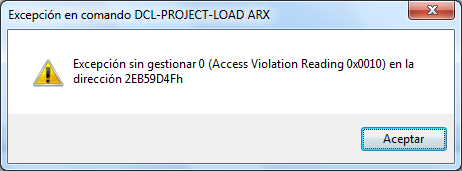
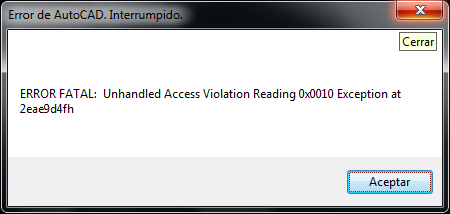
When i use opendcl file in Autocad 2016, the form show well. But when the form close, autocad crash (see attachment)
I use the last opendcl file (v 8.0.0.14) and the arx is OpenDCL.x64.20.arx (2044kb create jun-22-2014)
I cant use the opendcl dialog.
Can you help me?
Thanks and sorry about my english.,.
fred_tomke
2015-05-20 10:45 UTC
Hi, it depends on the lisp code. We need to know what happens in the code.
Greetings, Fred
dgpuertas
2015-05-20 11:06 UTC
oppps
When i use
(dcl-Project-Load "Media.odcl" nil) -> "Media" and run ok but AutoCAD crash when dialog close.
But if i use:
(dcl-Project-Load "Media.odcl" T) -> nil and AutoCAD show the following error:
it's strange because (dcl-Project-Load "Media.odcl" nil) run when autocad is clear, nothing load before.
fred_tomke
2015-05-20 12:48 UTC
Hi, please upload the project for debugging.
Regards, Fred
dgpuertas
2015-05-20 16:13 UTC
I have a lot of odcl, here I show simply one.
I thing that the code is not the problem cause its too simply but......
Thanks
fred_tomke
2015-05-20 17:46 UTC
Hi, call me silly, but (odcl-define_datum "ED-50" "45" nil) works fine, as well as (dcl-Project-Load "d:\\temp\\Media.odcl" T). One, two three, four times. What to do for crashing?
Befehl: (dcl-getversionex)

"8.0.0.13"
Regards, Fred
Peter2
2015-05-22 16:54 UTC
author=dgpuertas link=topic=2268.msg11408#msg11408 date=1432115966 wrote:...I use the last opendcl file (v 8.0.0.14) and the arx is OpenDCL.x64.20.arx (2044kb create jun-22-2014)...
June 2014? Here are my data:
OpenDCL.x64.20.arx 2.068 k 14.05.2015 21:59 -a--
dgpuertas
2015-05-28 08:35 UTC
Sorry for this days outside..
its the versión,
(dcl-getversionex)
"8.0.0.7"
_$
Where can i download the arx file? Because i download the Opendcl Studio (v8.0.0.13) and i dont know where is the arx file
Thanks and sorry about my english.
dgpuertas
2015-05-28 08:49 UTC
Its fine, im sorry.
i thougth that download the Opendcl Studio the arx its downloaded too. :-\
Now i download de Runtime (last versión) and works fine. :D
Thanks and Sorry
owenwengerd
2015-05-28 09:23 UTC
OpenDCL Studio does also include the runtime. Unless you made some manual copies of the runtime files and loaded the copies, updating OpenDCL Studio should also update the runtime files.
CADwiesel
2015-07-22 12:08 UTC
Hi there,
now i got the same Prob.
But im shure it's not on the Runtimes part.
I found out, that the error encoures, when leaving the opendcl box using the ok or cancel Button.
Debugging the code finding out, that the error encoures, while leaving the odcl box and swiching back to lisp function.
fred_tomke
2015-07-26 08:47 UTC
Hi, CADwiesel, I cannot reproduce the problem.
Do you have an example to demonstrate?
Fred
 error2016.bmp (289035 bytes)