String length

Started by velasquez · 2015-10-03 11:46 UTC · 6 replies · SMF topic #2317

I had to use an invisible grid control to know the length of a string with dcl-Grid-CalcColumnWidth and pass the value to the width of a Label control in design mode. The width of the Label control will set the width of a Modal form en OnInitialize.
Does anyone know a better way to work with this?

Thanks,
Velasquez
Am I understanding correctly that the width and caption of the label are ultimately fixed and you are doing this to get zero margins?
author=roy_043 link=topic=2317.msg11657#msg11657 date=1443981508 wrote:
Am I understanding correctly that the width and caption of the label are ultimately fixed and you are doing this to get zero margins?


Hello Roy,
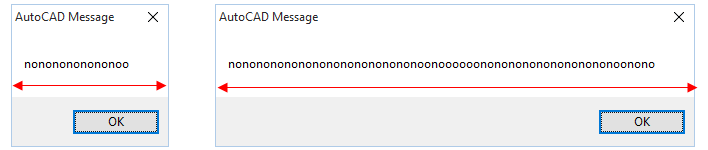
I need to create a modal form that works like AutoCAD Alert or as dcl-MessageBox in OpenDCL.
Attachments
In your first post when you say 'design mode', which I have interpreted as 'design time', you in fact mean 'at run time'.
It is an interesting problem and I think your solution is pretty clever, but I don't know a better one. I have checked dcl-Control-GetProperties and dcl-Control-Dump but they do not provide useful hidden information.
author=roy_043 link=topic=2317.msg11659#msg11659 date=1444062585 wrote:
In your first post when you say 'design mode', which I have interpreted as 'design time', you in fact mean 'at run time'.
It is an interesting problem and I think your solution is pretty clever, but I don't know a better one. I have checked dcl-Control-GetProperties and dcl-Control-Dump but they do not provide useful hidden information.

When you have talked at runtime.
Use the hidden grid was the best I have found.
Thanks Roy

(defun c:test_form_OnInitialize (/ JoyWidth)
;;;Calculating the width of the Label control
  (setq JoyWidth (dcl-grid-calccolumnwidth test/form/Grid1 strText)) ;_ visible = false
;;; Apply the width of the form
  (dcl-control-setwidth test/form (+ JoyWidth 8))
;;; Apply the width in Label control
  (dcl-control-setwidth proj/form/label JoyWidth)
;;;
  (dcl-control-setcaption test/form/label strText)
) ;_ fim de defun
Attachments
Thank you for sharing the code.
If you set 'Use Right From Right' to 1 for the label its width should automatically change with the width of the form.
author=roy_043 link=topic=2317.msg11661#msg11661 date=1444119160 wrote:
Thank you for sharing the code.
If you set 'Use Right From Right' to 1 for the label its width should automatically change with the width of the form.


Thank you Roy
I used your suggestion.