Started by Peter2 ·
2018-01-31 08:25 UTC ·
5 replies · SMF topic #2572
Peter2
2018-01-31 08:25 UTC
Example:
- You are user "Peter Doe" on Win 10
- You get an ODCL file via Outlook
- You doubleclick on the attachment - and get the dialogue "OPENDCL STUDIO C:\Users\Peter was not found."
maybe a problem with blank in the pathname?
fred_tomke
2018-02-01 11:34 UTC
Hi, this is maybe windows related, if you save attachments from outlook you may have to unlock them before using/opening them. That means right-click the file > properties > Zulassen.
Regards, Fred
Peter2
2018-02-02 11:27 UTC
I don't know - other software-apps open their files without problems from same user path ...
owenwengerd
2018-02-02 12:23 UTC
Please try changing the registry key that specifies the command, adding quotes around the path. It is this key:
HKCR\OpenDCL.Project\shell\open\command
Change the default value to:
"C:\Program Files (x86)\OpenDCL Studio\OPENDCL STUDIO.EXE" "%1"
Does that fix the problem?
fred_tomke
2018-02-02 12:25 UTC
Hi, Peter, it works fine for me.
Regards, Fred
Peter2
2018-02-02 13:33 UTC
Maybe it is an AV problem (timing, refreshing, ...) , because a doubleclick in a path which has spaces works fine.
Thanks - let's close this topic here.
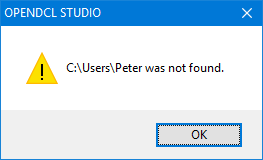 opendcl_patherror.png (3222 bytes)