Let's go thru this...
Open OpenDCL maximized, see three buttons in top right corner, press and see app close.
Open OpenDCL maximized again, File|Open an .odcl file maximized in the work space.
See two rows of three buttons in top right corner. First row is for the app and second row is for the document window.
Press middle button in bottom row, see document window shrink. Now, on shrunken window, press and see document window close. Open an .odcl file maximized again.
Press in bottom row (document window), see OpenDCL app close. I believe this should close only the document window as it did when document window was shrunken.
win7 32 & opendcl 9.0.3.0
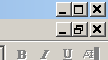 6 Buttons.png (743 bytes)