Started by goodonline ·
2020-04-05 13:31 UTC ·
5 replies · SMF topic #2730
goodonline
2020-04-05 13:31 UTC
I am having an issue with the "option list" buttons. As shown in the image, the buttons are very small on a 4k display when viewed in Autocad.
In OpenDcl version 9.0.6.1, the "option list" does display normally.
Thanks for the quick update for Autocad 2021 compatibility!!! :D
Autocad 2020
OpenDcl version 9.0.6.1
owenwengerd
2020-04-06 00:19 UTC
Does it help if you uncheck 'Use visual style' for the radio buttons?
goodonline
2020-04-06 13:19 UTC
Is that option within the OpenDCL editor under the Optionlist Properties? (I cannot find the setting to 'uncheck')
I did find the lisp function which I have had no luck using:
dcl-Control-SetUseVisualStyle "name of control" nil)
Thanks Owen,
- Rob.
goodonline
2020-04-06 21:14 UTC
The "option button" has the 'use visual style' checkbox in the properties.
The "optionList" does not.
Is this by design.
I will convert the list to individual buttons if it is by design.
owenwengerd
2020-04-07 00:57 UTC
I don't recall details, but apparently it was difficult or impossible to make the optionlist _not_ use the visual style, so it is not necessarily "by design", but more like "too hard to fix".
goodonline
2020-04-07 12:36 UTC
Not a problem, I will utilize the option buttons instead.
Thank you for all you do Owen.
- Rob.
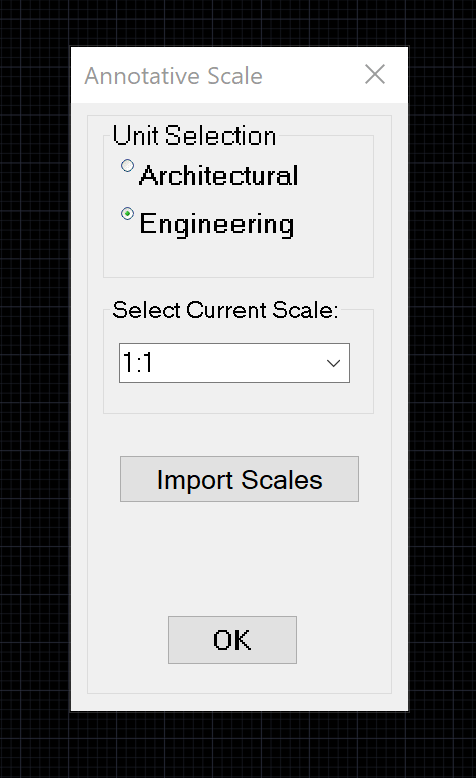 Annotation 2020-04-05 072506.png (56712 bytes)