2021-07-29 20:44 UTC
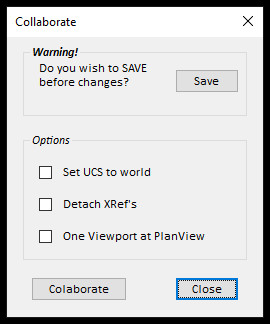
I'm new to OpenDcl, I've been told it would be easier to write DCL code here from Mr. Darren Young from XtraCAD. So far I've been able to at least get a dialog to come up and close, Yea! I'm to the point where I'm not sure how to get my functions to work. I would like to be able to check a box or two, depending on what options I need, and then push the button "Collaborate" to run my lisp and run the routines that were checked.
I would also like to be able to use the "Save" button to save my drawing before running this routine.
Any help would be appreciated, thanks!
See attached screen shot of dialog.
My lisp code:
I would also like to be able to use the "Save" button to save my drawing before running this routine.
Any help would be appreciated, thanks!
See attached screen shot of dialog.
My lisp code:
(command "OPENDCL") ;;;Ensure the appropriate OpenDCL ARX file is loaded


(defun c:Collab ()

   (dcl_Project_Load "Collab" T) ;;;call the method to load the Collab.odcl file.

   (dcl_Form_Show Collab_PopUp) ;;;call the method to show the Collab dialog box example

   (princ)

)

;;;set values of labels

(defun c:Collab/PopUp#OnInitialize (/)

  (dcl-Control-SetCaption Collab/PopUp/Label1 "Do you wish to SAVE before changes?")

  (dcl-Control-SetCaption Collab/PopUp/Label2 "Set UCS to world")

  (dcl-Control-SetCaption Collab/PopUp/Label3 "Detach XRef's")

  (dcl-Control-SetCaption Collab/PopUp/Label4 "One Viewport at PlanView")

)


;;;set button parameters

(defun c:Collab/PopUp/CloseButton#OnClicked (/)

  (dcl-Form-Close Collab/PopUp)

)


;;;set check box parameters

(defun c:Collab/Form1/CheckBox1#OnClicked (nValue /)

  (if (= nValue 0)

    (dcl_Control_SetEnabled Collab_PopUp_Form1 nil)

;;;    (dcl_Control_SetEnabled Collab_PopUp_Form1 T)

)

)
Attachments
 Collab.jpg (20061 bytes)