Hi, ElectroBOG, or better: sdrasdwuitjes, towaritsch? ;)
at first: welcome to this board!
Secondly: my English is worse, too. So, if anybody won't understand what you wrote - she/he will ask what you meant. No fear! Just post.
At last: OpenDCL was not loaded. OPENDCL command only exist if a certain reg key exist. So, give me the key of the AutoCAD release you use. Togehther we will create a registry key file to add this feature to AutoCAD.
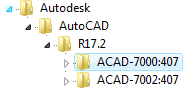
Have a look at the registry and find this path: HKEY_LOCAL_MACHINE\SOFTWARE\Autodesk\AutoCAD\
Which AutoCAD releases and products you use? See the picture at the bottom.
Here is the registry file content for Civil 3D 2008 German.
Windows Registry Editor Version 5.00


[HKEY_LOCAL_MACHINE\SOFTWARE\Autodesk\AutoCAD\R17.1\ACAD-6000:407\Applications\OpenDCL]

"Loader"="C:\\Programme\\Gemeinsame Dateien\\OpenDCL\\OpenDCL.17.arx"

"Description"="OpenDCL"

"LoadCtrls"=dword:0000000c


[HKEY_LOCAL_MACHINE\SOFTWARE\Autodesk\AutoCAD\R17.1\ACAD-6000:407\Applications\OpenDCL\Commands]

"OPENDCL"="OPENDCL"
What you have to do is to copy the content above to notepad and save it to a reg-file, acad2009_rus.reg or similiar.
Then replace
- R17.1 with R17.2 (for 2009)
- ACAD-6000:407 with the key for the russian or english product (i don't know)
- C:\\Programme\\Gemeinsame Dateien with the top common files folder. In the folder you should find the OpenDCL folder, too. Don't move this !!!
Save the file. Double click the file to add the content to the registry.
Restart AutoCAD. It should work now.
Normally, this should be added automatically when installing OpenDCL.
I do not use the OPENDCL command in my code. I load the ARX-file using (arxload).
Regards,
Fred