2008-05-14 10:00 UTC
Hello,
when I want to show icons in a listview in the first column in each row then I have to add icons to the listview's imagelist and I have to use them in dcl_listview_filllist or dcl_listview_additem. In this case the text in these cells will be indented for the images.
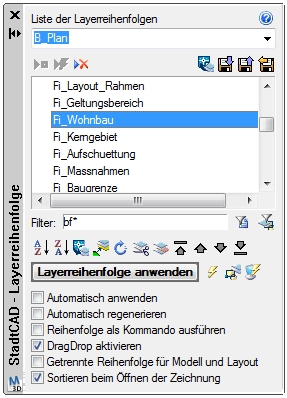
In the following screenshot I have a listview without any icon in the imagelist but nevertheless the texts are indented. That was not so in earlier releases. Is this by design?
Fred
when I want to show icons in a listview in the first column in each row then I have to add icons to the listview's imagelist and I have to use them in dcl_listview_filllist or dcl_listview_additem. In this case the text in these cells will be indented for the images.
In the following screenshot I have a listview without any icon in the imagelist but nevertheless the texts are indented. That was not so in earlier releases. Is this by design?
Fred
Attachments
 layerorder.jpg (89075 bytes)