Slide Image

Started by jambanks · 2008-07-17 13:37 UTC · 3 replies · SMF topic #379

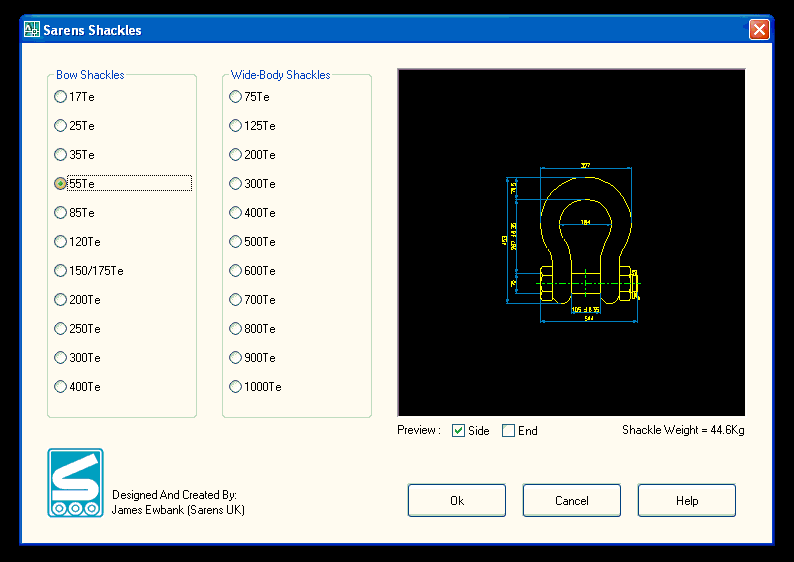
I currently have the attached programme working usng the code (dcl_SlideView_Load SarensShackles_shackleform_SlideView1 slideside) but as you can see the slide appears very small.
I have tried to increase the slide using the following code, but when i do the slide does not appear at all? any ideas how to get this to work?

(dcl_SlideView_SlideImage SarensShackles_shackleform_SlideView1
  (list  (list 
5
5
5
5
5
slideside)
))
Attachments
I haven't tested it myself you, but this is what the intelligent help says:

(dcl_SlideView_SlideImage Untitled_Form1_SlideView1 
(list  (list 
  UpperLeftX [as Integer]
  UpperLeftY [as Integer]
  Width [as Integer]
  Height [as Integer]
  FileName [as String]
{Optional}  SlideLibraryImageName [as String])
... ))


You have a total of (5) 5's. So you're passing an Int. where there should be a string (or maybe that was just a type-o).
Also you're setting your Width & Height to 5 pixels. That's pretty small and would be hard to see.
try something like:

(list
5
5
150
150
slideside
)


As a last resort you could recreate your slides. Strangely the aspect ratio of your Acad editor window has an effect on the zoom factor of the slide. I always create a square box around my objects, then stretch the Acad application window so it's as close to a square as possible. Then I create the slide.
Yeah the extra 5 was a typo, trust me to type code when frustrated.
I really like the trick about, changing the size of the autocad application, it did exactally what i need. So am just going to go down that route,

Thanks for the help.
Cool, I'm glad it helped.