Started by velasquez ·
2008-12-04 12:37 UTC ·
12 replies · SMF topic #496
velasquez
2008-12-04 12:37 UTC
Hi
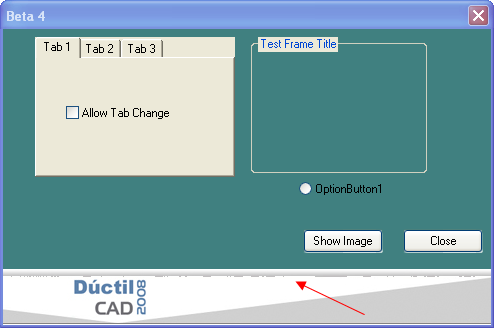
I don't get to show an image correctly in PitcureBox.
Could anybody reproduce this to know if it is a BUG?
Thanks
velasquez
2008-12-09 11:59 UTC
Hi
Did anybody already get to test the image that I posted in PictureBox of Beta-4?
I need to know because she appears bad.
Thanks
owenwengerd
2008-12-09 16:41 UTC
Can you post a small test project that demonstrates the problem?
velasquez
2008-12-09 17:39 UTC
Ok Owen
I posted the test files.
Thanks
owenwengerd
2008-12-09 18:04 UTC
It looks like the problem is due to OpenDCL masking any pixels with RGB color 192,192,192 as transparent. I opened your image in Paint Shop, reduced the colors to 16, then resaved in .jpg format, and the problem disappeared.
velasquez
2008-12-09 18:53 UTC
Hi Owen
I cannot change the color of the logo in my image.
See another created image in the same way and that works well.
Also see the same image in OenDCL 4.1.2.2
velasquez
2008-12-09 18:56 UTC
Excuse I forgot to post the images.
bazzacad
2008-12-09 19:43 UTC
Transparency for color 192,192,192 was added in version 5 by design. So that's why it looks fine in version 4.
If you don't want to change the image yourself tell the author of it, that it can't use color 192,192,192.
It looks like it's just a mistake in the gradient as some of the pixel in the bottom row are 193,192,192 & 194,192,192.
Or if you want I can change that one bottom row of pixels to all one consistent color without changing any other colors.
Or you last option would be to change the background color of the pic. box to color 192.192.192, so then the transparent pixels will actually show the real color & look as you expect, but I do think that's a very good solution.
velasquez
2008-12-09 20:30 UTC
Your suggestion to change color of background of PictureBox for 192 192 192 worked perfectly.
I will remember this.
Thank you very much.
bazzacad
2008-12-09 20:43 UTC
author=velasquez link=topic=496.msg2274#msg2274 date=1228854651 wrote:
Your suggestion to change color of background of PictureBox for 192 192 192 worked perfectly.
I will remember this.
Thank you very much.
I'm glad it helped, but I still think you should get the image fixed. :)
velasquez
2008-12-09 21:12 UTC
I would like to know to do this a lot of images they exist in my project.
Do you can me to explain as doing this?
I work with Photoshop.
Thanks
bazzacad
2008-12-09 23:45 UTC
author=velasquez link=topic=496.msg2276#msg2276 date=1228857143 wrote:
Do you can me to explain as doing this?
I work with Photoshop.
You want me to explain how to do this?
Use the rectangle selection tool & zoom in a select the 1 pixel row on the bottom of the gradient.
Use the fill tool and fill it what a new color, something like 194,192,192.
That's it.. :)
velasquez
2008-12-10 10:24 UTC
Ok
Thanks for your help.
You could tell me something on the one that I posted in Working with transparency.
http://www.opendcl.com/forum/index.php?topic=495.0
 Test-PictureBox.png (21929 bytes)
 base-488x56.jpg (32579 bytes)