Boards /
Runtime/AutoLISP /
Topic 825
problem with 5.1 picturebox
Started by Amsterdamned ·
2009-06-22 09:21 UTC ·
14 replies · SMF topic #825
Amsterdamned
2009-06-22 09:21 UTC
Hello there
Since I changed all my stuff to 5.1 I get a funny problem with a picture box in one of my files.
The wmf files I load do not seem to fit anymore. Is there a setting that forces the picture to fit the box?
Thanks
Bernd
owenwengerd
2009-06-22 12:35 UTC
Can you post screen shots showing both what you get and what you should get?
Amsterdamned
2009-06-22 13:38 UTC
I would if i knew how to do that..... :o
bazzacad
2009-06-22 17:58 UTC
author=Amsterdamned link=topic=825.msg4095#msg4095 date=1245677911 wrote:
I would if i knew how to do that..... :o
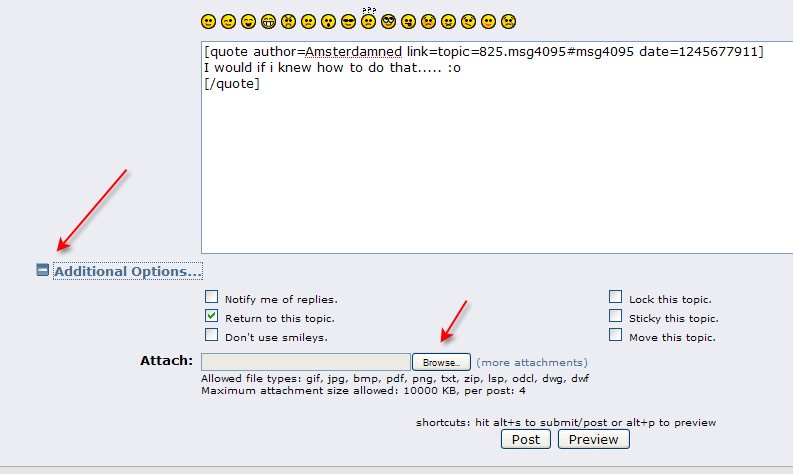
Click the "Additional Options" link below, then you can browse to attach an image.
Do you need help creating the screen shot?
Amsterdamned
2009-06-24 12:54 UTC
Yes, that would be nice. If i take the sreen shot, i can insert it into word. But how can i make a one for that forum? I now made a pdf form my word file.....
Bernd
owenwengerd
2009-06-24 13:08 UTC
That's a lot more work than necessary for creating a screen shot, but it works. What is the value of the 'Auto Size' property of the picture box? Can you post (or email) the .odcl file?
Amsterdamned
2009-06-24 13:28 UTC
Owen,
that value is "False". I don't want the control to resize, i want the image to fit the control.
owenwengerd
2009-06-24 17:36 UTC
I cannot reproduce the problem here. Can you post the .wmf file you're using, along with the lisp code that you use to load it?
owenwengerd
2009-06-25 14:49 UTC
I tested with your .wmf files, and they appear to be working correctly for me. Loading them with the Stretch argument set to T causes them to appear smaller than necessary because the .wmf contains a lot of unused canvas in the width direction. The images you attached in your earlier post show the .wmf loaded with Stretch set to NIL, but you told me via email that you use Stretch set to T. Therefore, I'll guess that you're using NIL, which would mean the resulting size is dependent on your display resolution and Windows font settings.
Amsterdamned
2009-06-25 15:36 UTC
Oke. If it is depending on machine settings, I will have another problem (see my other post). I need to get that dock able form work on different computers where I don’t have any influence on their settings… How can I accomplish that?
owenwengerd
2009-06-25 15:51 UTC
You'll have to set Stretch to T.
Amsterdamned
2009-06-26 11:16 UTC
Owen,
with stretch you mean the auto size?
owenwengerd
2009-06-26 12:07 UTC
No, I'm referring to the Stretch argument to (dcl_PictureBox_LoadPictureFile).
Amsterdamned
2009-06-26 13:51 UTC
Owen,
Thanks, that was the problem Id didn’t even know that option was there… :o
Was that in 4.1 already there as well? Anyhow, it works perfect.
Thanks,
Bernd
owenwengerd
2009-06-26 15:22 UTC
The Stretch argument has been there from the beginning as far as I know.