Boards /
Studio/Dialog Editor /
Topic 865
Freature Request - Vertical Justification for Labels
Started by zeeboy ·
2009-08-07 17:05 UTC ·
14 replies · SMF topic #865
zeeboy
2009-08-07 17:05 UTC
I love the Click event for labels and I'm using labels more dynamically now. But I think it would be great to be able to have a label be larger vertically if there was a vertical justification property.
Thanks for all your great work!
Doug
owenwengerd
2009-08-07 19:00 UTC
Can you give an example?
zeeboy
2009-08-08 20:34 UTC
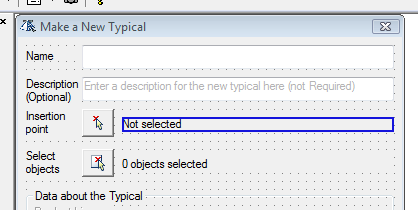
In the attached image file I've got a label "Not selected" next to a button. I have the "Clicked" event for both the label and the button set and they both do the same "event" the user clicks on either.
If you were to implement the Vertical Justification for labels I would make my "Not selected" label vertically larger such that its height matches the height of the button adjacent. This will just make it that much easier for the user to select either the label or the button.
This is not a huge "deal" for me. Just a convenience request.
Thanks!
Doug
owenwengerd
2009-08-08 22:19 UTC
Have you considered just making the label a button? If you make it a flat graphic button with no border, it should look just like a label, except the caption will be centered.
zeeboy
2009-08-09 02:27 UTC
I looked into using a Flat style Graphic Button but that doesn't have the Justification property for Left justification that I need. I want the Horizontal justification and the Vertical. :)
owenwengerd
2009-08-09 04:33 UTC
Gotcha. Another option is a picture box, which can have text drawn on it and behave like a button.
zeeboy
2009-08-10 18:32 UTC
Other than creating an image with the text value, how do you add text to a Picture box?
zeeboy
2009-08-10 18:34 UTC
Looking into more it I'm guessing the Picturebox_DrawText method. If that is indeed the way to go feel free to not reply. I'll give my feedback once I implement it.
Thanks!
zeeboy
2009-08-10 20:59 UTC
I think this will work but I'm having the hardest time getting the example in Methods.odcl to work! I've copied the example code and changed the control to mine but I still can't get it to return T with dcl_PictureBox_DrawText or dcl_PictureBox_DrawWrappedText.
(dcl_PictureBox_Clear psMakeTyp-MkTyp_pctrbxInsPnt) returns T though.
Any suggestions?
owenwengerd
2009-08-10 21:39 UTC
If you can post your code, perhaps someone can spot the error.
zeeboy
2009-08-11 01:53 UTC
(dcl_PictureBox_Clear psMakeTyp-MkTyp_pctrbxInsPnt)
(dcl_PictureBox_DrawText
psMakeTyp-MkTyp_pctrbxInsPnt
(list
(list 10 10 -19 20 st%insertion_point_helper "TL")
)
)
(dcl_PictureBox_DrawWrappedText
psMakeTyp-MkTyp_pctrbxInsPnt
(list
(list 10 10 220 -19 "This sample text is supposed to wrap around if the width of the text is going to exceed the allowed width given." "L")
)
)
I got most of it from the Methods.lsp sample code.
Kerry Brown
2009-08-11 02:10 UTC
ZEEBOY,
I think posting a (minimal ) sample form and (minimal) control code may make it easier for someone to attend to your error.
owenwengerd
2009-08-11 03:31 UTC
Your code looks fine. Are you calling this code from your form's OnInitialize event? If so, that is the reason. The DrawXXX functions draw directly onto the display memory, so they fail when the picture box is not visible. In OnInitialize, it is not yet visible. Try drawing the text in the picture box control's OnPaint handler instead.
zeeboy
2009-08-11 17:46 UTC
I did have the code in the OnInitialize event and after using the Paint event on the Picture Box control everything works as initially desired.
THANKS!!!
I would still like to see the Vertical Justification added to Label controls. They are much easier and faster to work with than this process for the Picture Box control. :)
fred_tomke
2009-08-14 06:26 UTC
Hi, zeeboy,
would you be so kind to add a screenshot with the result of using DrawText? I'd like to see the difference 'cause it sounds interesting.
Thanks!
Fred