Started by thatcadguy ·
2009-09-22 12:50 UTC ·
6 replies · SMF topic #933
thatcadguy
2009-09-22 12:50 UTC
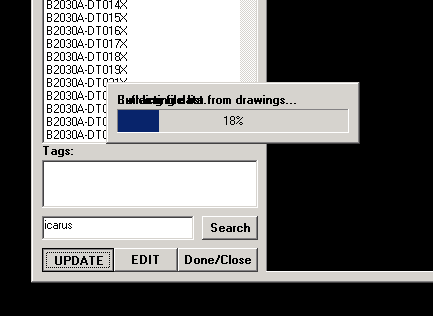
Is there anyway to avoid having the text bleed into itself like this?
Just using dcl_Control_SetCaption right before a heavy data extraction process.
Pretty sure this is Windows' fault, not OpenDCL's.
copter
2009-09-22 15:28 UTC
Try this inside your loop:
(dcl_Control_SetCaption 'Label "")
(dcl_Control_Redraw 'Label)
(dcl_Control_SetCaption 'Label "My text")
Copter
owenwengerd
2009-09-22 16:22 UTC
Which version of OpenDCL Runtime are you using? I'm pretty sure this problem is fixed in current builds.
thatcadguy
2009-09-22 19:03 UTC
author=owenwengerd link=topic=933.msg4677#msg4677 date=1253636544 wrote:
Which version of OpenDCL Runtime are you using? I'm pretty sure this problem is fixed in current builds.
6.0.0.3 on 2008
thatcadguy
2009-09-22 19:08 UTC
author=copter link=topic=933.msg4674#msg4674 date=1253633332 wrote:
Try this inside your loop:
(dcl_Control_SetCaption 'Label "")
(dcl_Control_Redraw 'Label)
(dcl_Control_SetCaption 'Label "My text")
Copter
Thanks Copter, that works like a charm.
Btw, just installed 6.0.0.5 and am still seeing the same behavior (before using copter's method)
owenwengerd
2009-09-23 01:47 UTC
I just did a quick test changing the caption manually in a modeless dialog, and it repainted correctly. It may be that your processing loop does not do allow Windows to process messages. If that's the case, the following might work as well (and use less processor time):
(dcl_Control_SetCaption 'Label "My text")
(dcl_Control_Redraw 'Label)
fred_tomke
2009-09-25 07:14 UTC
Hi, thatcadguy, in my experiences I could solve this by using BackColor (for the label) -16 instead of -24.
Fred
 untitled.PNG (7780 bytes)