Method Get Mouse Over a control

Started by stephan_35 · 2009-10-19 09:22 UTC · 15 replies · SMF topic #978

Hello,

Still blocked with getting the mouse position over a control.

Why ?

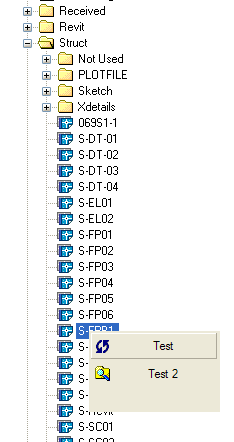
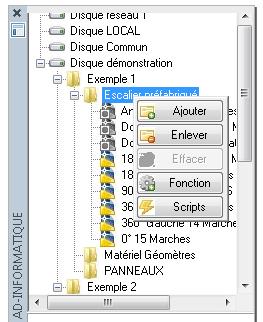
I would like to build a RightClick menu over a treecontrol, that need to know where is the mouse over it to know where appear the new menu.

Yes, I know there is the OnMouseMove Event, but always add lines in AutoCad Command Lines, then need to put to synchronous invoke, that makes drag and drop to autocad failed !!!

So, i need to get the mouse position with a function which will be call when it need to .

Thanks for help.

Best regards.

Attachments
Have you tried to use (dcl_GetMouseCoords) to achieve this?
Hi, but this strikes in the right direction.
I can remember that somewhere in the early times there was an example of a board member showing how to call a context menu using "menucmd" after right click in a tree or listview. I tried to find it but I couldn't yet. Is there someone out there who is familiar with menucmd?

Fred
author=owenwengerd link=topic=978.msg4983#msg4983 date=1255968379 wrote:
Have you tried to use (dcl_GetMouseCoords) to achieve this?


Thanks a lot owen !

This is the best soluce of my problem !

Best regards.
author=Fred Tomke link=topic=978.msg4988#msg4988 date=1256018258 wrote:
Hi, but this strikes in the right direction.
I can remember that somewhere in the early times there was an example of a board member showing how to call a context menu using "menucmd" after right click in a tree or listview. I tried to find it but I couldn't yet. Is there someone out there who is familiar with menucmd?

Fred


Thanks fred for reply.

Using menucmd could be another way , but seem to be hard to cutomise the context menu, depending of selected item.

Keep this in my mind  ;)

Best regards.
Fred, I also remember a post about this, but I could not find it. As I recall, I thought it was very clever, but I never used it myself.
Are you referring to my 'clever' code?
Looks like I posted it over at SF before we stated the forums.
{2}
It works ok, but will only work on Modeless forms & is a pain to deal with since you have to edit the CUI(x)

I'd still prefer having a Right-Click menu control built into OpenDCL.
{2}

I'll play around with (dcl_GetMouseCoords) a little more to see if I can get better results.
OK I did a quick test and this is working ok...
I just added this code:

  (setq MouseCoords (dcl_GetMouseCoords))
  (dcl_Form_Show TMaCAD_RCM (car MouseCoords) (cadr MouseCoords))

(defun c:TMaCAD_RCM_GraphicButton1_OnClicked (/)
(dcl_Form_close TMaCAD_RCM)
)

(defun c:TMaCAD_RCM_GraphicButton2_OnClicked (/)
(dcl_Form_close TMaCAD_RCM)
)


It's not perfect, for example if you don't click on the RCM, it stays up, so a built-in solution would still be preferred.
Attachments
author=BazzaCAD link=topic=978.msg4993#msg4993 date=1256059375 wrote:
It's not perfect, for example if you don't click on the RCM, it stays up, so a built-in solution would still be preferred.


I did it as like you, i just add an OnMouseMovedOff Event


(defun c:BOX_RightClick_OnMouseMovedOff (/)
  (dcl_Form_Close BOX_RightClick)
)


Best regards.
James posted some here
{2}
{2}
I haven't had a good look at it though.
author=owenwengerd link=topic=978.msg4991#msg4991 date=1256041356 wrote:
Fred, I also remember a post about this, but I could not find it. As I recall, I thought it was very clever, but I never used it myself.


Hi Owen,

the great Barry has posted it {2}.
You are right - he is very clever!  :)

Fred
I've collected all the knowledge and built an {2}.

Fred
this seems like a pretty neat thing
i think ill mess around with this  :o
I finally got around to trying and work in a context menu into some of our dialogs.
In attempting to implement this, I'm having some difficulty.  It seems it requires the dialog to be Modeless, correct?  Can it work with a Modal form?

--J
Hi, honestly, I must say that I haven't tried it yet in modal forms. I cannot say whether menucmd needs full access to AutoCAD.
Regards, Fred
It most certainly does require the form to be Modeless.
I'd just recommend declaring that in the sample code.

As an alternative for Modal forms, I have a modal form without a title bar, and mousemove events that toggle the visibility of Frames around the text items.  It doesn't have the nice transparent blue highlight of a menu, but looks fairly sharp.  It should hold until I can get my primary dialogs converted to Modeless.

--J