dcl_Grid_SetCellStyle >> option button

Started by s.barszczewski · 2009-10-23 15:14 UTC · 4 replies · SMF topic #987

Hello
Runtime 6.0.0.9

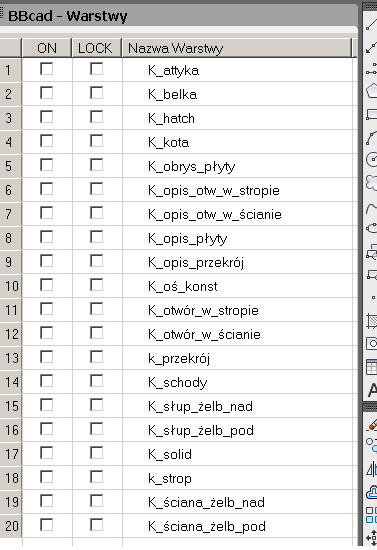
as you can see below I'm filling grid with data, in column 1 and 2 there should be checbox and it works but in column 3 there should be option button and layer name , but when I run lisp in autocad it doesn't show option button there is ony blank space left for button .
I've atached a screenshoot from autocad

(repeat (length bb_lista_warstw)
 
  (setq nrow (dcl_Grid_AddRow "manwar" "Form1" "Grid1" (rtos (1+ bb_licz) 2 0) "" "" (nth 1 (nth bb_licz bb_lista_warstw) )))
 
  (setq bb_licz (1+ bb_licz))
 
  (dcl_Grid_SetCellStyle "manwar" "Form1" "Grid1" nrow 1 1)
  (dcl_Grid_SetCellStyle "manwar" "Form1" "Grid1" nrow 2 1)
  (dcl_Grid_SetCellStyle "manwar" "Form1" "Grid1" nrow 3 2)
   
);repeat

Any ideas ?
Attachments
Can you upload a simple sample that demonstrates the problem? Alternatively, provide step by step instructions for reproducing it in the Grid sample.
here lisp file and odcl file with example

The aim is to make option button visible in every row in column 3 , in current state it isn't shown

(dcl_Project_Load "manwar" T)
(dcl_Form_Show "manwar" "Form1")


(dcl_Grid_Clear "manwar" "Form1" "Grid1")

; list of layers data definition In orginal it's read from file
(setq bb_lista_warstw
      (list
(list "bb_w_attyka" "K_attyka" "220" "continuous")
(list "bb_w_belka" "K_belka" "3" "continuous")
(list "bb_w_hatch" "K_hatch" "9" "continuous")
(list "bb_w_kota" "K_kota" "6" "continuous")
(list "bb_w_obrys_plyty" "K_obrys_plyty" "5" "continuous")
(list "bb_w_opis_otw_w_stropie" "K_opis_otw_w_stropie" "240" "continuous")
(list "bb_w_opis_otw_w_scianie" "K_opis_otw_w_scianie" "230" "continuous")
(list "bb_w_opis_plyty" "K_opis_plyty" "2" "continuous")
(list "bb_w_opis_przekroj" "K_opis_przekroj" "80" "continuous")
(list "bb_w_os_konst" "K_os_konst" "252" "ACAD_ISO10W100")
(list "bb_w_otwor_w_stropie" "K_otwor_w_stropie" "232" "continuous")
(list "bb_w_otwor_w_scianie" "K_otwor_w_scianie" "20" "continuous")
(list "bb_w_K_przekroj" "k_przekroj" "52" "continuous")
(list "bb_w_schody" "K_schody" "100" "continuous")
(list "bb_w_K_slup_zelbnad" "K_slup_zelb_nad" "200" "HIDDEN2")
(list "bb_w_slup_zelb_pod" "K_slup_zelb_pod" "50" "continuous")
(list "bb_w_solid" "K_solid" "16" "continuous")
(list "bb_w_strop" "k_strop" "192" "continuous")
(list "bb_w_sciana_zelb_nad" "K_sciana_zelb_nad" "210" "HIDDEN2")
(list "bb_w_sciana_zelb_pod" "K_sciana_zelb_pod" "40" "continuous")
);list
      );setq

(setq bb_licz 0)

(repeat (length bb_lista_warstw)
 
  (setq nrow (dcl_Grid_AddRow "manwar" "Form1" "Grid1" (rtos (1+ bb_licz) 2 0) "" "" (nth 1 (nth bb_licz bb_lista_warstw) )))
  (setq bb_licz (1+ bb_licz))
  (dcl_Grid_SetCellStyle "manwar" "Form1" "Grid1" nrow 1 1)
  (dcl_Grid_SetCellStyle "manwar" "Form1" "Grid1" nrow 2 1)
  (dcl_Grid_SetCellStyle "manwar" "Form1" "Grid1" nrow 3 2)
 
 
);repeat

(dcl_Control_Redraw "manwar" "Form1" "Grid1")
Attachments
Thanks, this bug is now fixed for the next build. Everything works correctly if you perform the initialization inside an OnInitialize event handler instead of waiting until after (dcl_Form_Show) returns, so you can use that as a workaround in the meantime.
Thanks for the solution . It works :)

Best Regards
Sebastian